 FileScanner.online
 URLScanner.online
What Is Ransomware? A Plain-Language Explanation
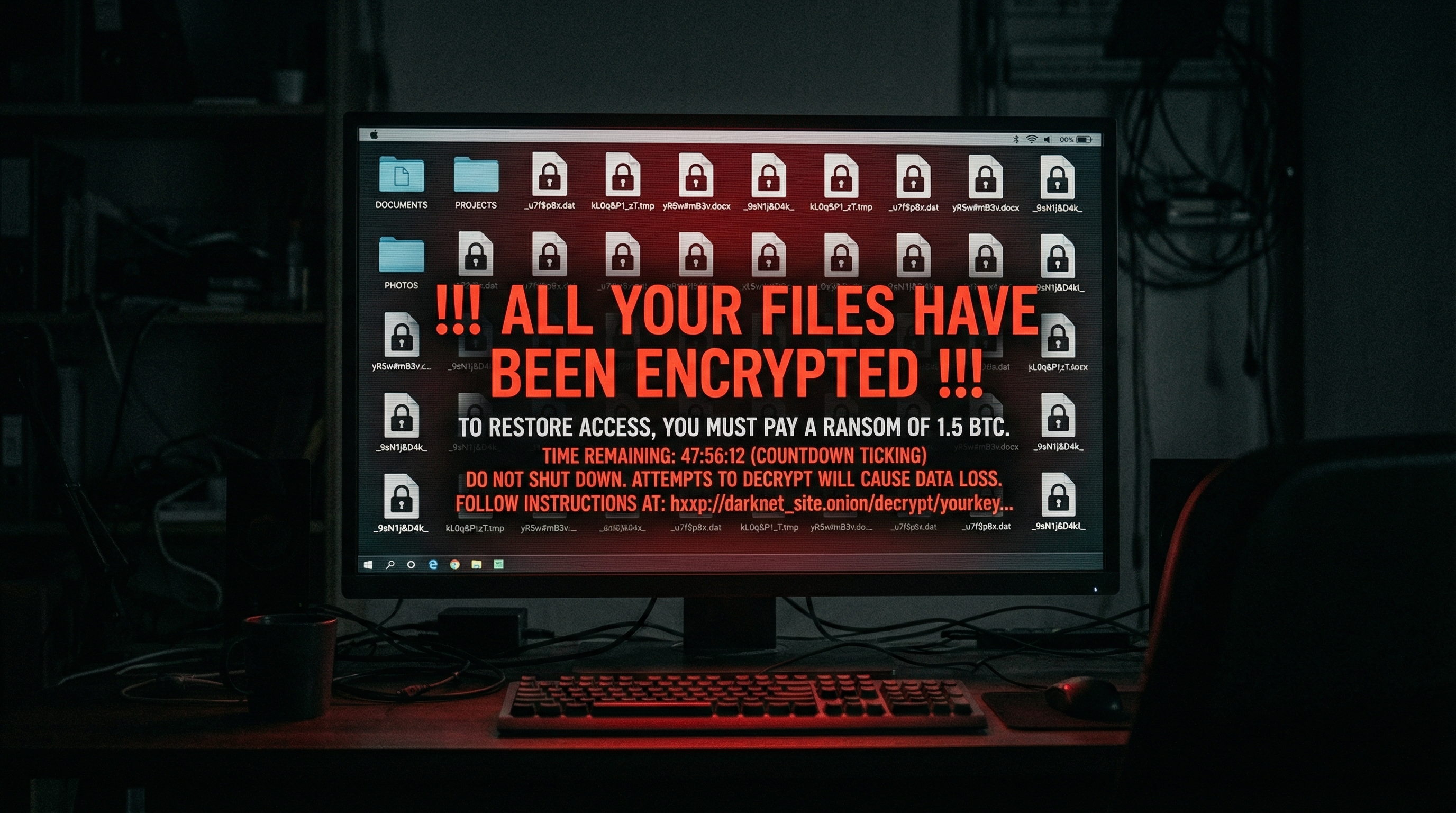
Ransomware is a category of malware that encrypts the victim's files and demands payment — typically in cryptocurrency — in exchange for the decryption key needed to restore access. It is currently the most financially damaging form of cybercrime targeting businesses and institutions worldwide.
The mechanics are straightforward: an attacker gains access to your system, deploys software that scrambles your files using strong encryption that cannot be reversed without the correct key, and then presents a ransom note demanding payment within a deadline — typically 72 hours — before the price doubles or the data is permanently destroyed.
What makes ransomware uniquely destructive is its combination of immediate operational impact and long-term leverage. Unlike data theft, which a victim might not notice for weeks, ransomware is immediately and completely disruptive. A business whose files are encrypted cannot operate: orders cannot be processed, medical records cannot be accessed, manufacturing equipment cannot run. The attacker doesn't need to negotiate from a position of strength — the victim's own inability to function creates enormous pressure to pay.
In recent years, ransomware operators have added a second layer of leverage through double extortion: before encrypting, they exfiltrate a copy of the victim's data. If the victim restores from backups rather than paying, the attacker threatens to publish the stolen data on a public leak site. For businesses subject to GDPR, HIPAA, or NIS2 — or simply for organizations whose clients expect confidentiality — this threat can be more damaging than the encryption itself.
Understanding ransomware isn't just for security professionals. Any business owner, IT administrator, or employee who handles computer systems needs to understand how these attacks work, because prevention is orders of magnitude cheaper than recovery.
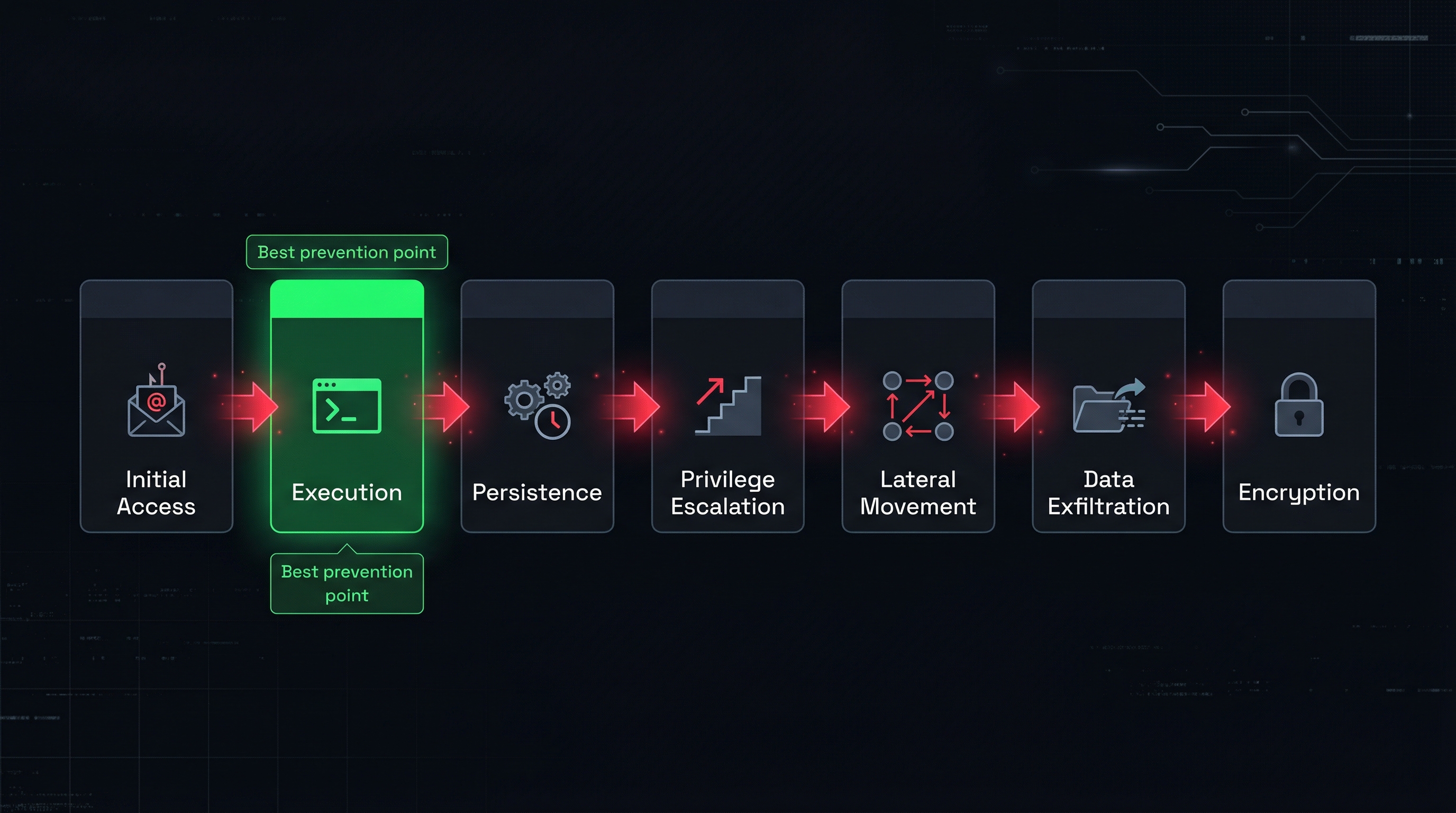
How a Ransomware Attack Actually Unfolds: The 7-Stage Kill Chain
Ransomware does not simply appear on a computer and immediately encrypt everything. In most cases — especially against business targets — an attack follows a deliberate, multi-stage progression that can unfold over days or even weeks before encryption begins. Understanding each stage is key to understanding where the attack can be stopped.
Stage 1 — Initial Access. The attacker gains their first foothold on the target network. The most common vectors are phishing emails with malicious attachments or links, exploitation of unpatched software vulnerabilities (particularly internet-facing systems like VPNs, firewalls, and RDP servers), and credentials purchased from Initial Access Brokers on underground marketplaces — other criminals who specialize in breaking into organizations and selling the access.
Stage 2 — Execution. The initial payload is executed on the victim's machine. This might be a malicious macro in a Word document, a script embedded in a PDF, or a loader executable disguised as legitimate software. The execution stage is the last point at which automated file scanning can stop the attack before it progresses — catching the malicious file before it runs is the highest-leverage intervention in the entire kill chain.
Stage 3 — Persistence. The attacker installs mechanisms to ensure they maintain access even if the victim reboots or changes some credentials. This typically involves creating scheduled tasks, registry run keys, or new user accounts with elevated privileges.
Stage 4 — Privilege Escalation. The initial foothold usually provides limited user-level access. The attacker exploits local privilege escalation vulnerabilities or stolen administrator credentials to gain full administrative control of the compromised machine and, eventually, domain administrator privileges across the entire network.
Stage 5 — Lateral Movement. With administrator credentials, the attacker moves across the internal network, compromising additional machines, identifying backup systems, and mapping the organization's infrastructure. During this phase — which can last days — the attacker is essentially invisible to most security tools.
Stage 6 — Data Exfiltration. In double extortion attacks, the attacker copies sensitive files before deploying encryption. This is often the first stage that triggers anomaly detection, as large volumes of data suddenly leaving the network is an unusual pattern.
Stage 7 — Encryption and Ransom Demand. The final stage: the ransomware payload is deployed simultaneously across all compromised machines. Files are encrypted within hours. Ransom notes appear on every affected system. Business operations cease.
The Most Common Ways Ransomware Gets In
Knowing how ransomware enters an organization tells you exactly where to focus your defenses. According to threat intelligence reports from the first quarter of 2026, the top initial access vectors for ransomware attacks against SMEs and mid-market organizations are:
Phishing emails with malicious attachments (37% of incidents). An email arrives appearing to come from a courier company, a supplier, a client, or an internal HR department. It contains an attachment — a ZIP file with an executable, a macro-enabled Office document, or a PDF with a malicious embedded script. The recipient opens it. The loader executes. The attacker has their foothold.
Exposed RDP and remote access services (28% of incidents). Remote Desktop Protocol (RDP) is the most commonly exploited attack surface in ransomware campaigns targeting SMEs. Organizations that enabled remote access for employees during or after the pandemic often did so by exposing RDP directly to the internet with weak credentials. Attackers use automated scanning tools to find these systems and either brute-force the credentials or use previously leaked passwords.
Unpatched software vulnerabilities (19% of incidents). Critical vulnerabilities in VPN appliances, firewalls, email servers, and web-facing applications are routinely weaponized within days of public disclosure. Organizations that delay patching these systems become easy targets as exploit code becomes widely available in underground markets.
Compromised credentials purchased from Initial Access Brokers (11% of incidents). A thriving underground economy has emerged around selling authenticated access to corporate networks. Credentials stolen from employees via previous phishing attacks or data breaches are sold to ransomware operators who then use them to log in directly, bypassing the need for a phishing campaign entirely.
Malicious software downloads and supply chain compromise (5% of incidents). Employees downloading pirated software, unauthorized tools, or compromised legitimate software installers can introduce ransomware loaders directly into the corporate network. Supply chain attacks targeting software updates — where a legitimate software vendor's update mechanism is compromised to distribute malware — represent a smaller but growing fraction.
| Initial Access Vector | Share of Incidents | Primary Defense |
|---|---|---|
| Phishing email with malicious attachment | 37% | Email security gateway + scan all attachments before opening |
| Exposed RDP / remote access brute force | 28% | Disable direct RDP exposure; require VPN + MFA for remote access |
| Unpatched vulnerability exploitation | 19% | Aggressive patch management; prioritize internet-facing systems |
| Purchased compromised credentials | 11% | MFA on all accounts; monitor for impossible logins |
| Malicious software / supply chain | 5% | Verify software sources; scan all executables before running |
filescanner.online
Scan Any File — Privately.
Deep binary analysis, YARA rules, AI summary, and PDF reports. Up to 2 GB. No account required.
Types of Ransomware: From Crypto-Lockers to Ransomware-as-a-Service
Not all ransomware is the same. Understanding the key categories helps you assess the severity of an incident and determine the appropriate response.
Crypto ransomware is the most common and destructive type. It uses strong asymmetric encryption (typically RSA + AES) to scramble your files, making them completely inaccessible without the decryption key held by the attacker. The files appear to still be there — you can see the filenames — but they cannot be opened. Examples include LockBit, BlackCat/ALPHV, REvil, and Clop. Recovery without the decryption key is generally not possible for modern crypto ransomware using correctly implemented encryption.
Locker ransomware doesn't encrypt your files — instead, it locks you out of your device entirely by disabling the operating system interface. A full-screen ransom message prevents access to anything on the device. While severe in terms of disruption, locker ransomware is generally less catastrophic than crypto ransomware because the underlying files are not destroyed, and the lock can often be removed with specialized tools without paying the ransom.
Double extortion ransomware combines file encryption with data theft. Before encrypting, the attacker exfiltrates sensitive data and threatens to publish it unless paid. This tactic was pioneered by the Maze group in 2019 and has now become the standard approach for most sophisticated ransomware operations. The double extortion model means that having good backups, while still essential for operational recovery, is no longer a complete solution — the attacker still holds leverage through the stolen data.
Triple extortion extends the pressure further by contacting the victim's clients, partners, or regulators directly — threatening to disclose the breach or sending stolen data samples as proof of access. This maximizes reputational pressure and can trigger regulatory investigations independently of whether the victim pays.
Ransomware-as-a-Service (RaaS) is not a technical variant but an operational model. RaaS platforms operate like legitimate software businesses: a core developer group builds and maintains the ransomware code and payment infrastructure, then licenses it to affiliates — criminal partners who conduct the actual attacks. Affiliates receive 70–80% of ransom payments; the developer group takes the remainder. This model has dramatically lowered the technical barrier to conducting ransomware attacks. LockBit 3.0, BlackCat/ALPHV, and Akira have all operated under the RaaS model.
Wiper malware is often discussed alongside ransomware but serves a different purpose. Wipers destroy data permanently without any mechanism for recovery, even after payment. They are typically used in nation-state attacks targeting critical infrastructure where disruption — not financial gain — is the objective. NotPetya, deployed against Ukrainian infrastructure in 2017 but which spread globally, is the most destructive historical example.
The Real Cost of a Ransomware Attack
When ransomware is discussed in the media, the headline number is typically the ransom demand. But for most organizations, the ransom is the smallest component of the total cost. Understanding the full economic impact is critical for making rational decisions about security investment.
Ransom payment. Demands vary enormously based on the attacker's assessment of the victim's ability to pay. Small businesses may see demands of €10,000–€100,000. Mid-market companies: €500,000–€5 million. Enterprises and critical infrastructure: €10 million or more. Payment is never guaranteed to result in a working decryption key — approximately 20% of organizations that pay receive incomplete or non-functional decryption tools.
Downtime and lost revenue. The average recovery time from a ransomware attack is 21 days, but significant disruption often persists for weeks beyond that. For a business that generates €50,000 in daily revenue, 21 days of downtime represents over €1 million in lost income — independent of any ransom payment.
Incident response and forensics. Professional incident response firms charge €1,000–€3,000 per hour. A thorough enterprise-scale ransomware investigation can require hundreds of hours. Forensic analysis to determine the root cause, establish the attacker's full access, and verify that all persistence mechanisms have been removed is not optional if you want to prevent re-infection.
System restoration and data recovery. Rebuilding compromised systems, restoring from backups, and verifying the integrity of recovered data requires significant time and expertise. Organizations without tested backup systems may need to partially or fully reconstruct lost data, which may not be possible for all file types.
Regulatory fines and legal costs. Under GDPR, a ransomware attack that results in personal data exposure must be reported to the relevant supervisory authority within 72 hours. Fines for failure to report, or for demonstrating insufficient security measures, can reach 4% of global annual turnover. Under NIS2 (which applies to a significantly broader set of organizations from 2024 onward), reporting obligations and potential penalties are even more stringent. Legal fees for managing regulatory inquiries and potential class action suits from affected clients add further cost.
Reputational damage. The least quantifiable but potentially most lasting cost. Clients who learn their data was exposed in a ransomware attack may terminate relationships. Prospective clients who research your company and find news coverage of a breach may choose competitors. For businesses in regulated industries — healthcare, finance, legal services — a publicized data breach can permanently damage the trust on which the business depends.
| Cost Component | Typical Range (SME) | Notes |
|---|---|---|
| Ransom payment | €10,000 – €500,000 | Payment does not guarantee data recovery; ~20% receive non-functional keys |
| Downtime / lost revenue | €50,000 – €2,000,000+ | Average 21 days; highest cost component for most businesses |
| Incident response & forensics | €20,000 – €300,000 | Required to verify full remediation; cannot safely skip |
| System restoration | €10,000 – €200,000 | Higher without tested backup systems |
| Regulatory fines (GDPR/NIS2) | €0 – Annual turnover × 4% | Mandatory breach notification; fines for inadequate security |
| Cyber insurance premium increase | 20–400% increase | Post-incident premiums rise significantly; some policies voided |
filescanner.online
Scan Any File — Privately.
Deep binary analysis, YARA rules, AI summary, and PDF reports. Up to 2 GB. No account required.
How to Prevent Ransomware: A Practical Defense Framework
The good news about ransomware prevention is that the vast majority of attacks are not sophisticated. They succeed because organizations have not implemented basic security controls. A pragmatic layered defense stops most ransomware at one of several stages before encryption occurs.
Layer 1 — Email Security. Since phishing emails carrying malicious attachments account for the largest share of ransomware infections, email security is your highest-leverage investment. Implement DMARC, DKIM, and SPF on your email domain to prevent spoofing. Use an email security gateway that inspects attachments before delivery. Train employees to treat any unexpected attachment with skepticism — even from known senders, since business email compromise is common.
Layer 2 — Scan All Files Before Execution. Implement a policy that any file received from outside the organization — attachments, downloads, USB drives — is scanned before opening. FileScanner.online performs deep static analysis of files, matching against 17 YARA rule categories and 70+ suspicious API patterns that are characteristic of ransomware loaders, droppers, and stagers. This catches ransomware at the execution stage — before the attacker establishes persistence — which is the most effective intervention point in the kill chain.
Layer 3 — Eliminate Unnecessary Attack Surface. Disable or restrict services that don't need to be internet-facing. RDP should never be exposed directly to the internet; if remote access is needed, require it to go through a VPN with multi-factor authentication. Audit internet-facing services quarterly and remove or harden anything that doesn't need to be publicly accessible.
Layer 4 — Patch Management. Critical vulnerabilities in internet-facing systems (VPNs, firewalls, web servers, email servers) are typically weaponized within 48–72 hours of public disclosure. Establish a patch management process that applies critical and high-severity patches to internet-facing systems within 72 hours of release. For internal systems, a 7–14 day window is more practical.
Layer 5 — Multi-Factor Authentication. Enable MFA on every account that can be used to access systems remotely or to access sensitive data. This single control defeats the 'compromised credentials purchased from IABs' attack vector almost entirely. Even if an attacker obtains a valid username and password, they cannot log in without the second factor.
Layer 6 — Endpoint Detection and Response (EDR). Modern EDR solutions monitor endpoint behavior in real time and can detect and automatically terminate processes exhibiting ransomware behavior — specifically, the rapid mass-encryption of files that characterizes Stage 7 of the kill chain. While EDR doesn't prevent initial infection, it can stop the encryption process within seconds of it beginning, significantly limiting damage.
Layer 7 — Tested, Offline Backups. The last line of defense. If all other controls fail and encryption occurs, offline backups that cannot be reached by the attacker allow recovery without payment. The critical details: backups must be offline (network-connected backups are often encrypted along with everything else), backups must be recent (the cost of restoring a three-week-old backup is the loss of three weeks of business data), and backups must be tested (many organizations discover their backup solution doesn't work during an actual incident).
Catching Ransomware Loaders Before They Execute
The most leverage in ransomware prevention is at the execution stage — specifically, identifying the malicious file before it runs. Once a ransomware loader executes and establishes persistence, defense becomes dramatically harder and more expensive.
Ransomware loaders — the initial payload that establishes access and downloads the main ransomware module — share structural characteristics that distinguish them from legitimate files. These include:
High entropy sections — Ransomware code is almost always packed or encrypted to evade signature-based antivirus detection. Packing dramatically increases the statistical randomness (entropy) of the executable's sections. A PE executable with multiple high-entropy sections that doesn't identify itself as a legitimate packing tool is a significant warning sign.
Process injection API patterns — Ransomware commonly injects into legitimate Windows processes (explorer.exe, svchost.exe) to hide its activity. The APIs used for this — VirtualAllocEx, WriteProcessMemory, CreateRemoteThread, NtQueueApcThread — appear in the file's import table and can be detected through static analysis before execution.
Anti-analysis techniques — Ransomware loaders often implement anti-debugging, anti-sandbox, and anti-VM checks to prevent automated analysis tools from observing their behavior. The presence of these checks in a file's import table or identified through YARA rule matching is itself a red flag.
Anomalous compilation characteristics — Files compiled very recently (within hours of being received), files with stripped debug information, and files with mismatched internal timestamps are all suspicious characteristics that emerge from binary analysis.
FileScanner.online checks all of these characteristics automatically. Upload a suspicious executable, macro-enabled document, or script before opening it, and the scanner will identify the structural indicators that flag ransomware loaders — often catching threats that are too new to appear in antivirus signature databases. Scan results are private: files are never shared with third parties, which is important if the file being analyzed was received as part of a targeted attack where tipping off the attacker could compromise your investigation.
For security teams and IT administrators who want to integrate file scanning into automated workflows — for example, scanning all email attachments as they arrive, or scanning files at network ingress points — FileScanner.online provides API access on paid plans.

urlscanner.online
Scan Any URL — In Under 2 Seconds.
8 parallel security modules: malware, SSL, DNS, phishing, WHOIS, headers, screenshots, and AI scoring. 100% private.
What to Do If You're Hit With Ransomware Right Now
If you've discovered a ransomware infection in progress or are looking at encrypted files and a ransom note, work through these steps immediately. Every minute matters — but systematic action beats panicked reaction.
Step 1 — Isolate immediately. Disconnect affected systems from the network. Unplug the network cable, disable WiFi, and if possible, physically separate affected machines from the network switch. Ransomware spreads laterally across networks, and the attacker may still be active within your environment. Every machine that remains connected is a potential additional encryption target. Do not shut down the systems yet — volatile memory may contain forensic evidence.
Step 2 — Identify the scope. Walk through the network and identify which systems are affected, which appear clean, and which have unusual activity. Document everything — which machines show ransom notes, which file types are encrypted, what the ransom note says, and any file extensions added to encrypted files (e.g., .lockbit, .akira). This documentation is essential for the forensic investigation and for your insurance claim.
Step 3 — Alert leadership and legal. A ransomware attack is an organizational crisis, not just an IT problem. Senior leadership needs to be involved immediately, because decisions about payment, public disclosure, and regulatory reporting will need to be made. Engage your legal counsel — under GDPR and NIS2, you have a 72-hour clock for notifying the relevant supervisory authority if personal data has been exposed.
Step 4 — Do not pay without professional guidance. Paying the ransom is never an automatic decision. Contact a professional incident response firm before making any payment decisions. Several reasons: payment may violate sanctions regulations if the attacker group is on an OFAC or EU sanctions list (which many are); payment does not guarantee a working decryption key; and paying funds the next attack. Additionally, a professional IR firm may be able to identify whether decryptors exist for the specific ransomware variant you've been hit with — several major ransomware families have had decryptors released through law enforcement operations.
Step 5 — Begin recovery from backups. If you have tested, offline backups, this is when they prove their value. Before restoring, ensure the environment is fully clean — restoring to a system that still has the attacker's persistence mechanisms in place will simply result in re-encryption. Your IR firm will help verify this.
Step 6 — Identify and close the initial access vector. Recovery without addressing the root cause is incomplete. How did the attacker get in? Was it a phishing email that an employee opened? An unpatched VPN? Compromised credentials? Identifying and closing this vector is the only way to prevent a repeat attack — which is extremely common when victims pay without addressing the underlying weakness.
Is Your Business Prepared? A Ransomware Readiness Assessment
The difference between an organization that recovers from ransomware in 48 hours and one that takes 6 weeks — or doesn't recover at all — is almost entirely determined by preparation made before the attack. Use this self-assessment to identify your most critical gaps.
Backups: Do you have offline backups of all critical business data? How recently were they last tested with a full restore? Is your backup solution completely isolated from the network (not just a network-attached drive on the same LAN)?
Email security: Do you have DMARC, DKIM, and SPF configured on your domain? Does your email platform scan attachments before delivery? Have employees received phishing awareness training in the last 12 months?
Remote access: Is RDP or any other remote desktop service exposed directly to the internet? Do all remote access accounts use multi-factor authentication? Are remote access logs monitored for unusual login patterns (logins from unexpected locations, off-hours access)?
Patch management: How quickly are critical patches applied to internet-facing systems? Do you have visibility into unpatched vulnerabilities across your environment?
Incident response plan: Do you have a written incident response plan that addresses ransomware? Do employees know who to call if they suspect an infection? Do you have a relationship with an external IR firm you can call in an emergency?
Cyber insurance: Do you have cyber insurance? Does your policy cover ransomware payments, incident response costs, regulatory fines, and business interruption? Have you checked that your actual security posture meets the policy's stated requirements?
If you answered 'no' or 'I don't know' to three or more of these questions, addressing those gaps should be your near-term security priority. The cost of the preventive measures described in this guide is a fraction of the average ransomware recovery cost — even for the smallest businesses.
Start with what provides the most leverage for the least cost: offline backups, MFA on all remote access accounts, and a policy of scanning all files before execution. These three controls, properly implemented, will prevent or limit the impact of the vast majority of ransomware attacks that target businesses at your scale.
filescanner.online
Scan Any File — Privately.
Deep binary analysis, YARA rules, AI summary, and PDF reports. Up to 2 GB. No account required.