 FileScanner.online
 URLScanner.online
Introduction: The Phishing Attack Your Security Stack Cannot See
There is a category of cyberattack that defeats email gateways, bypasses link-scanning tools, and routes around the corporate security controls protecting managed devices — not because it is technically sophisticated, but because it exploits a fundamental architectural blindspot in how email security was designed. Quishing — QR code phishing — is that attack. In 2025, incidents involving malicious QR codes increased by over 587% according to Abnormal Security threat data. In 2026, the technique has become a standard deliverable across campaigns ranging from mass credential-harvesting operations to targeted corporate espionage.
The premise is elegant and devastating: an attacker encodes a malicious URL inside a QR code image and embeds that image in a phishing email, a PDF attachment, a physical sticker, or a social media post. The victim scans the code with their smartphone camera. The camera app decodes the QR, extracts the URL, and opens it directly in the mobile browser — completely bypassing the corporate email gateway, the endpoint DLP agent, the SSL inspection proxy, and every other security control that operates on the managed desktop environment. The phone, which has access to corporate email and cloud services, connects to the phishing page with no filter in the chain.
This guide is a comprehensive deep-dive into quishing as it stands in March 2026. We cover the technical mechanics of how QR codes encode URLs and how trivially easy it is to weaponize that mechanism, the full attack chain from QR generation to credential theft, the five main delivery vectors in active use, why conventional security tools are architecturally blind to this threat, documented real-world campaigns, and a practical defense framework — including how to check any QR code URL safely using URLScanner.online before it opens in your browser.
How QR Codes Work: The Technical Foundation
To understand why quishing is so effective — and why it is so hard to stop — you need to understand what a QR code actually is at a technical level. A QR code (Quick Response code) is a two-dimensional matrix barcode that encodes data as a pattern of black and white modules (squares) arranged on a grid. Originally developed in 1994 by Denso Wave for automotive manufacturing, the format was standardized under ISO/IEC 18004 and has since become the universal mechanism for encoding short strings of data — most commonly, URLs — in a scannable visual format.
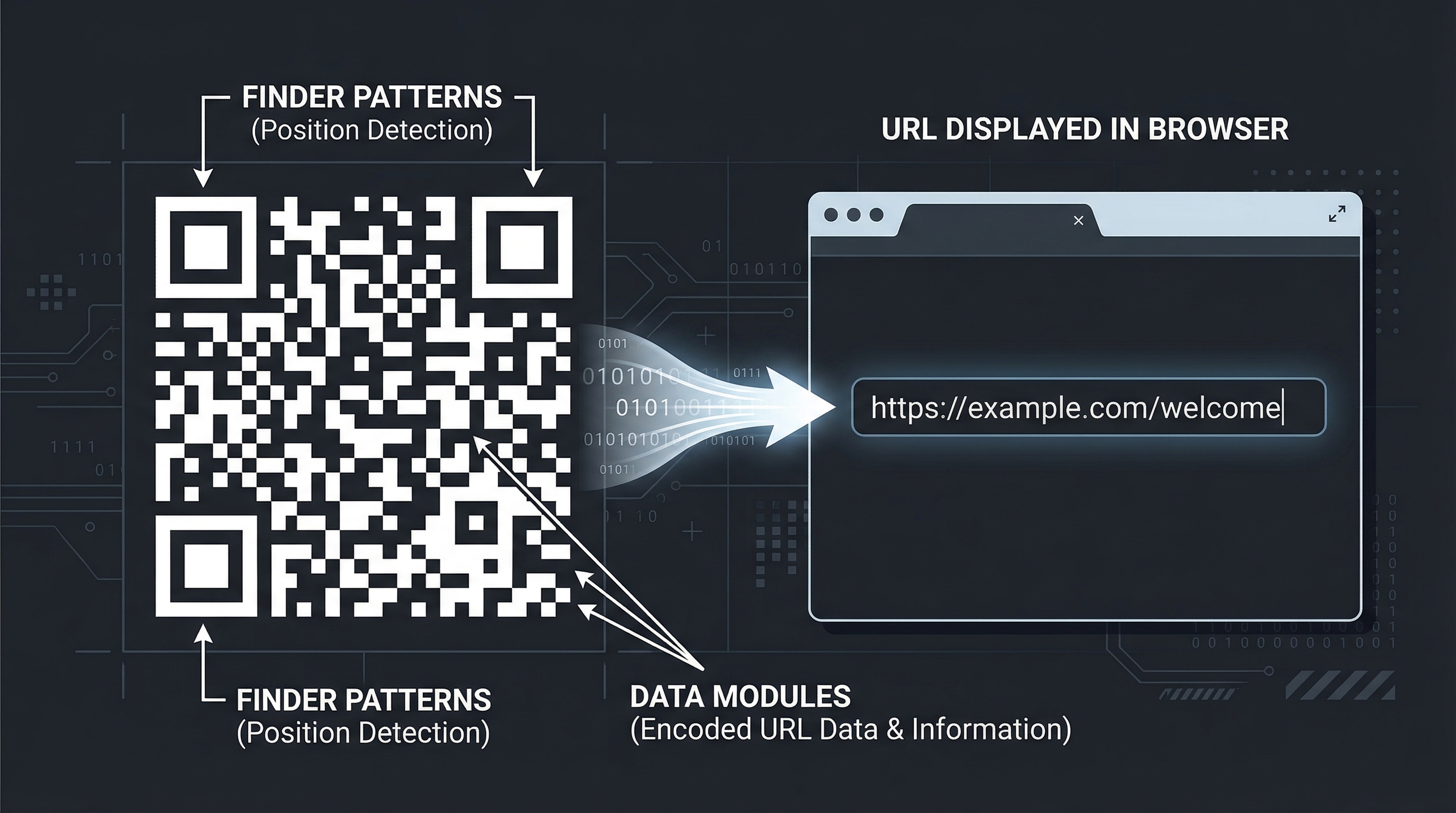
A QR code is divided into several structural zones. The three large squares in three corners are finder patterns — they allow any scanner, regardless of orientation or angle, to locate and align the code. The small square in the fourth corner position is the alignment pattern, used for geometric correction when the code is distorted. The row and column of alternating black-and-white modules between the finder patterns are timing patterns, which tell the scanner the size of each data module. The remaining modules encode the actual data, error correction codewords, and format information.
For URL encoding specifically, the QR standard uses a mode called byte encoding, which can represent any ASCII character. A URL like https://malicious-site.xyz/login is converted to its ASCII byte values, grouped into codewords, and written into the data region of the matrix. The more characters in the URL, the more modules are needed — which is why higher-version QR codes (larger grids, up to 177×177 modules) exist. A version 1 QR code (21×21 modules) can encode up to 17 bytes in byte mode. A version 10 QR code can encode up to 271 bytes — more than enough for any phishing URL.
Critically, the QR standard supports four levels of error correction: L (7% of codewords can be recovered), M (15%), Q (25%), and H (30%). Higher error correction means the QR code still scans correctly even if up to 30% of its modules are obscured or damaged. This is why QR codes with embedded logos — a feature commonly used by brands and, notably, by attackers trying to impersonate brands — still function. The logo covers a portion of the data modules, but the error correction data rebuilds the lost information during decoding. A QR code with a Microsoft, DocuSign, or PayPal logo embedded in it is just as trivially generated as one without, and is no more trustworthy.
The final piece of the technical picture is URL shorteners and dynamic QR services. Generating a QR code that encodes a long URL directly produces a dense, complex-looking code. To keep codes small and scannable in low-resolution prints, attackers routinely use URL shortening services (bit.ly, t.co, short.io) or dynamic QR services (where the encoded URL is a redirect that can be changed after the code is printed). This is particularly insidious: a dynamic QR code can be generated pointing to a benign URL, deployed at scale, and then redirected to a phishing page after all security checks have been completed.
What Is Quishing and Why It Exploded in 2025–2026
Quishing is the portmanteau of 'QR code' and 'phishing' — a phishing attack that uses a QR code as the delivery mechanism for a malicious URL instead of a traditional hyperlink. The term has been in use since approximately 2022 but only entered mainstream security awareness in 2024–2025, as the volume of real-world attacks made the threat impossible to ignore.
The technique's explosion is directly tied to two trends that converged in the post-pandemic era. First, the normalization of QR codes in everyday life. Restaurant menus, parking payments, boarding passes, business cards, retail loyalty programs, bank correspondence, and government services all shifted to QR-based interactions between 2020 and 2023. Users learned to scan QR codes reflexively and trustingly — an instinctive behavior that attackers now exploit. Second, the widespread adoption of cloud-based productivity platforms — Microsoft 365, Google Workspace, DocuSign, Salesforce — which use QR codes in their own legitimate multi-factor authentication and document verification flows, giving attackers a credible and familiar template to mimic.
The technical reason for the explosion, however, is simpler: quishing works. It consistently bypasses the email security controls that organizations have invested heavily in. Proofpoint, Cofense, and Check Point Research all published reports in 2025 documenting the industrialization of quishing — campaigns sending millions of QR code emails per day, targeting Microsoft 365 credentials specifically, with bypass rates against standard email gateways exceeding 90%. In Q1 2026, threat intelligence data shows quishing has become a standard technique in the initial access playbook of both cybercriminal groups and nation-state operators, used for everything from credential harvesting to BEC fraud enablement.
How Attackers Generate Malicious QR Codes
One of the most important things to understand about quishing is how low the technical barrier to entry is. Generating a functional malicious QR code that will successfully deliver a victim to a phishing page takes approximately 30 seconds and zero specialized knowledge. This is not a technique reserved for sophisticated threat actors — it is accessible to anyone with a browser and a phishing page to point to.
At the most basic level, any of dozens of free web-based QR code generators — qr-code-generator.com, qrcode-monkey.com, the-qrcode-generator.com — accept a URL input and produce a downloadable QR code image in PNG, SVG, or PDF format. The attacker enters their phishing URL, optionally customizes the colors and embeds a brand logo using the high error correction mechanism described above, and downloads the image. It is then trivially embedded in an HTML email, a Word document, or a PDF.
At a slightly more sophisticated level, attackers use programmatic QR generation libraries available in Python (qrcode, segno), JavaScript (qrcode.js, node-qrcode), and virtually every other programming language. This allows them to generate QR codes at scale — a single script can produce thousands of unique QR codes in minutes, each encoding a slightly different URL with a unique tracking parameter to identify individual victims. The QR code images are then automatically embedded into templated phishing emails and sent through bulk mailing infrastructure.
The most operationally advanced actors use dynamic QR code services. These services, offered commercially for legitimate marketing purposes, encode a redirect URL into the QR code rather than the final destination URL. The redirect URL is hosted on the QR service's own infrastructure — a clean, reputable domain — and points to whatever URL the attacker configures in a dashboard. The attacker generates and deploys the QR codes with the redirect pointing to a benign page, waits until after any security review period has passed, then redirects it to the live phishing page. This technique renders domain reputation checks and pre-deployment QR content analysis completely useless.
Attackers targeting specific organizations add an additional layer of customization: they scrape publicly available brand assets (logos, color schemes, official email templates) and produce QR code images that are visually indistinguishable from those used in the organization's own legitimate communications. A quishing email impersonating Microsoft's MFA verification flow uses Microsoft's exact logo, color palette, and email template structure — the only difference is that the QR code routes through attacker-controlled infrastructure.
The bottom line: there is no technical sophistication gate on quishing. The malicious QR code in a nation-state spear-phishing campaign and the one in a script-kiddie credential harvesting operation are generated by the same type of tool, look identical, and are equally dangerous. Defense cannot be based on detecting QR generation complexity because there is none.
The only reliable defense is analyzing the URL that the QR code resolves to — and doing so before that URL opens in a mobile browser. Extracting the URL from a QR code image and submitting it to URLScanner.online gives you a full behavioral analysis of the destination — JavaScript execution, redirect chain, domain age, phishing indicators — without opening it on any real device.
| Generation Method | Skill Required | Scale | Custom Branding | Dynamic Redirect |
|---|---|---|---|---|
| Free web QR generator | None | Manual / low | Yes (logo embed) | No |
| Python / JS QR library | Basic coding | High (thousands/min) | Yes (programmatic) | No |
| Dynamic QR service | None | High | Yes | Yes — post-deployment redirect |
| Phishing kit with QR module | None (kit handles it) | Automated | Yes (branded templates) | Often yes |
| Custom C2 QR generator | Advanced | Unlimited | Fully custom | Yes — real-time rotation |
urlscanner.online
Scan Any URL — In Under 2 Seconds.
8 parallel security modules: malware, SSL, DNS, phishing, WHOIS, headers, screenshots, and AI scoring. 100% private.
The Quishing Attack Chain: Step by Step
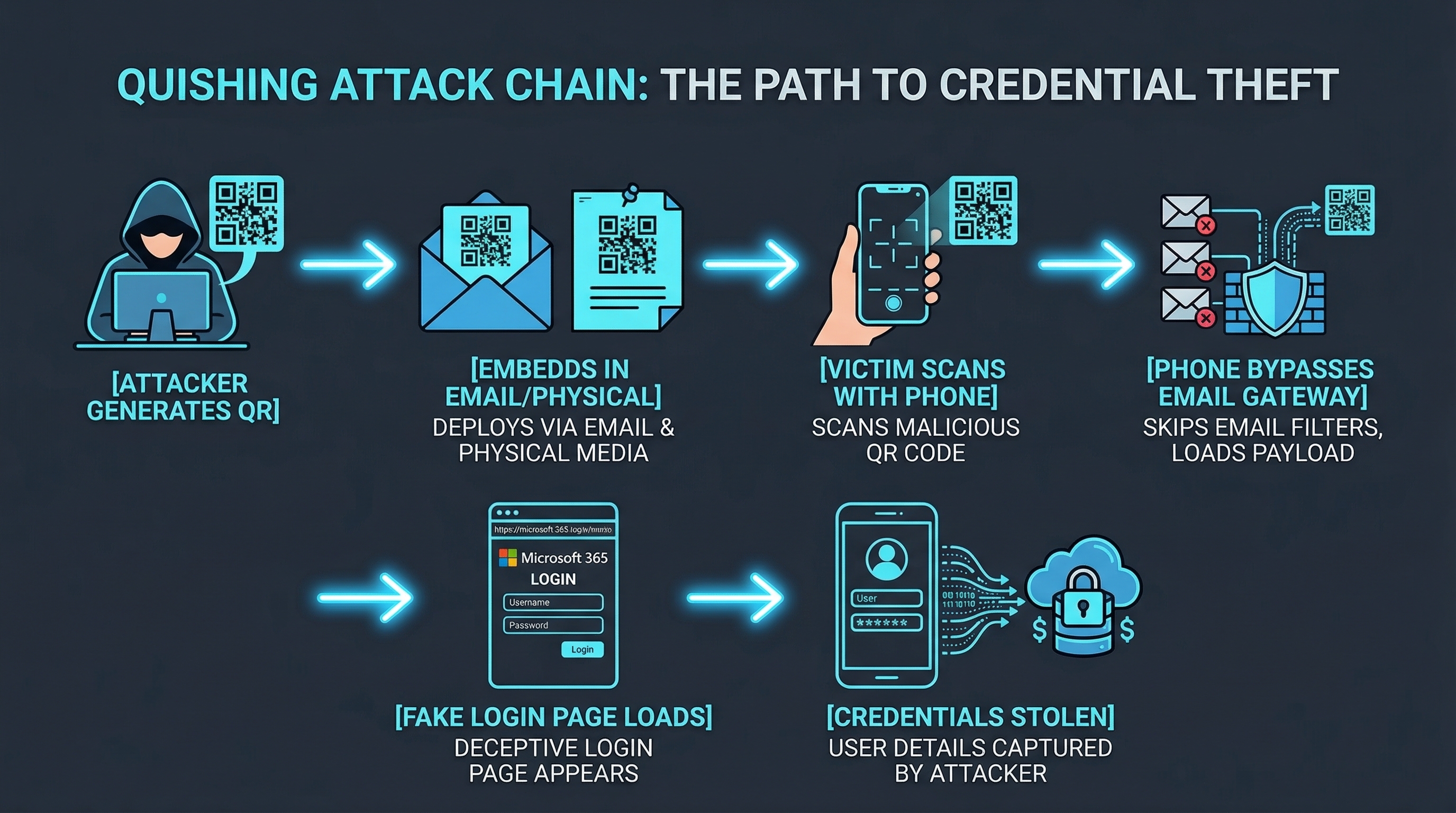
Understanding the full attack chain — from the attacker's first action to credential theft — clarifies exactly where defenses can and cannot intervene. The following is the forensic anatomy of a typical quishing campaign targeting corporate Microsoft 365 credentials, the most common quishing scenario in 2026.
Step 1 — Phishing infrastructure setup. The attacker registers a lookalike domain — for example, microsoftonline-verify.com or a randomized domain like secure-auth-portal.xyz — and deploys a cloned Microsoft 365 login page. The domain is typically registered within 0–14 days of the campaign. A valid TLS certificate is obtained through Let's Encrypt or ZeroSSL, which are free and automated. The page is hosted on a cloud VPS and fronted by Cloudflare to obscure origin infrastructure.
Step 2 — QR code generation. The phishing URL is encoded into a QR code image using any of the methods described above. The QR code is customized with Microsoft branding — the Microsoft logo embedded at the center, using the blue color scheme of official Microsoft communications. High error correction (level H) is used to ensure the code remains functional even with the logo overlay.
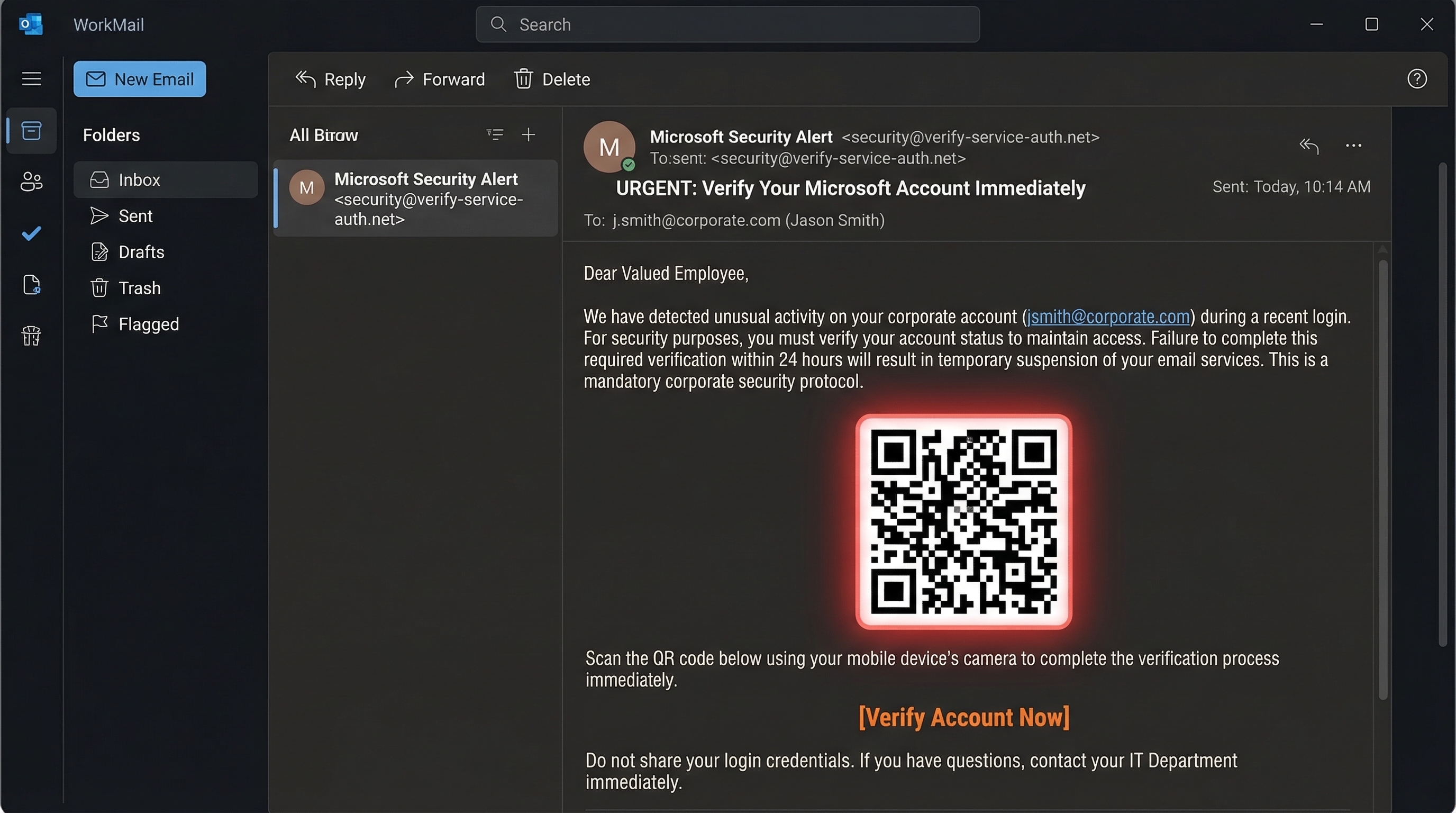
Step 3 — Email construction and delivery. The QR code image is embedded into a phishing email template that impersonates a Microsoft 365 MFA re-enrollment notification, a Conditional Access policy enforcement alert, or an account security review. The email body contains no suspicious hyperlinks — just the QR code image and instructional text. The sending address is spoofed to appear as [email protected] or sent from a compromised legitimate mailbox to pass DMARC checks.
Step 4 — Gateway bypass. The email arrives at the target organization's email gateway — Microsoft Defender for Office 365, Proofpoint, Mimecast, or similar. The gateway scans the email for malicious URLs in the message body and header. It finds none, because the URL is encoded inside a PNG image. It scans attachments for malware signatures. There are none. The email has a clean sender reputation (either spoofed from a legitimate domain or sent from a recently compromised mailbox). The gateway delivers the email to the inbox.
Step 5 — Victim scans the QR code. The recipient reads the email on their corporate laptop or mobile device and sees a QR code with familiar Microsoft branding and urgent language. They open their phone camera app — the standard iOS or Android camera natively decodes QR codes — and point it at the QR code displayed on their screen. The camera decodes the URL and presents a tap-to-open notification. The victim taps.
Step 6 — Mobile browser opens the phishing page. The phone's browser opens the phishing URL directly. There is no corporate proxy, no DLP agent, no SSL inspection layer between the phone's browser and the attacker's server. The phone may have MDM enrollment, but MDM does not inspect real-time browser traffic. The victim sees a pixel-perfect Microsoft 365 login page.
Step 7 — Credential capture (and MFA bypass). The victim enters their email address and password. In sophisticated campaigns, the phishing page is an adversary-in-the-middle (AiTM) proxy — it relays the credentials to the real Microsoft login page in real time and returns the MFA challenge to the victim. When the victim approves the MFA push, the attacker's proxy captures the authenticated session cookie. The attacker now has persistent access to the Microsoft 365 tenant, including email, SharePoint, Teams, and any connected SaaS applications — without needing the victim's password or MFA device going forward.
The Five Main Quishing Attack Vectors
Quishing is not limited to email. The same technique — encoding a malicious URL in a QR code image — can be deployed across a wide range of surfaces. The following five vectors account for the vast majority of documented quishing incidents in 2025–2026.
1. Email with embedded QR image is the highest-volume vector, accounting for roughly 70% of quishing incidents according to Cofense research. The email typically impersonates a corporate IT notification, a cloud platform authentication request, or a financial document requiring signature. The QR code is embedded as an inline image in the email body or as an image inside a PDF attachment — the latter adds one more layer of separation from URL scanning tools.
2. PDF and Office document delivery. Attackers embed QR codes inside PDF files, Word documents, and Excel spreadsheets. The document is delivered as an email attachment and may contain legitimate-looking content (a contract, an invoice, a policy document) to lower suspicion. Embedded QR codes inside document files are almost universally invisible to email gateway scanning engines, which scan attachment content for executable code and macro threats — not for QR-encoded URLs pointing to phishing pages.
3. Physical QR code attacks (quishing in the real world). Attackers print malicious QR code stickers and place them over legitimate QR codes in high-traffic public locations. Documented targets include parking meters and payment kiosks (replacing official payment QR codes with attacker-controlled ones), restaurant table QR menus, package delivery notifications left at doorsteps, and conference registration desks. Physical quishing exploits a trust assumption that humans make about physical objects in professional or public contexts — 'if it's printed and physically there, it must be legitimate.'
4. Multi-factor authentication fatigue via quishing. Some campaigns specifically target the MFA enrollment or re-enrollment process. Employees are sent emails claiming their MFA device needs to be re-registered due to a security policy change, with a QR code to scan to begin the process. Scanning the QR code initiates an attacker-controlled flow that either harvests credentials directly or tricks the victim into enrolling the attacker's device as an MFA factor — giving the attacker persistent authentication access independent of the victim's own device.
5. Social media, messaging apps, and digital signage. QR codes shared via LinkedIn messages, WhatsApp, Telegram, and Microsoft Teams are increasingly used for targeted attacks. Digital signage in office lobbies, hotel conference centers, and airports has been compromised to display malicious QR codes in high-trust physical environments. The combination of a professional physical setting and a familiar QR code UI element produces extremely high scan rates.
| Attack Vector | Target Profile | Common Lure | Detection by Gateway | 2026 Prevalence |
|---|---|---|---|---|
| Email (inline QR image) | Broad / corporate | MFA re-enrollment, IT alert | No — image not decoded | Very High |
| PDF / Word document attachment | Corporate, finance | Contract, invoice, policy doc | No — embedded image in file | High |
| Physical sticker overlay | General public | Payment QR, menu, delivery | N/A — not email | Medium, rising |
| MFA enrollment quishing | Corporate IT users | Security policy re-enrollment | No | High, targeted |
| Social media / messaging apps | Executives, finance teams | Shared document, invitation | No — unmanaged channel | Medium, rising |
Why Email Gateways Are Architecturally Blind to Quishing
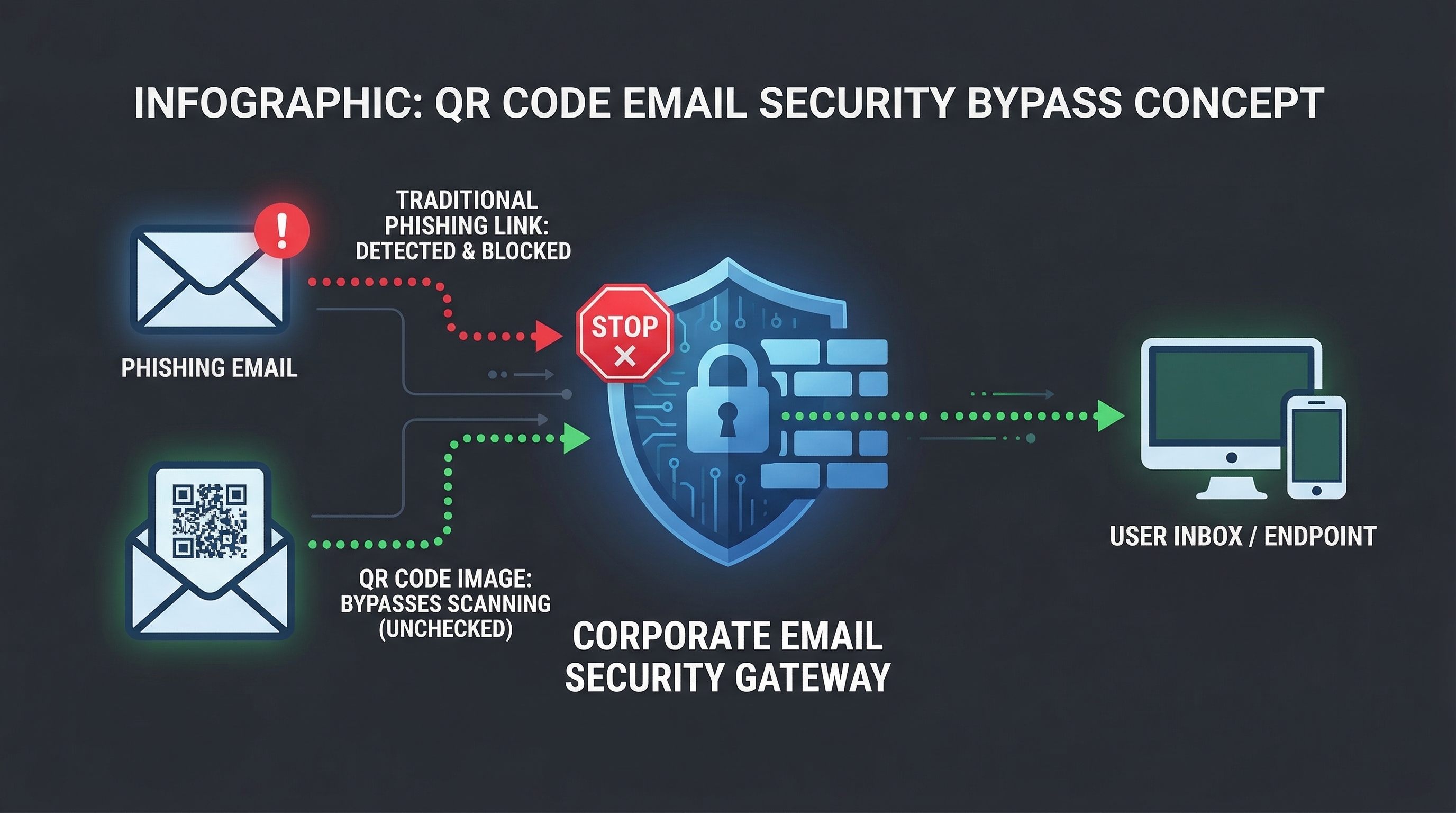
The failure of email security tools to stop quishing is not a bug — it is an architectural consequence of how those tools were designed. Understanding this is important because it means the problem cannot be solved simply by updating rules or signatures. It requires a fundamentally different approach.
Email security gateways — whether cloud-native products like Microsoft Defender for Office 365, Proofpoint Essentials, or Mimecast — were built around the assumption that a phishing attack delivers a hyperlink. The URL is present in the email body as HTML or plain text, and the gateway can extract it, follow it, detonate the page in a sandbox, check the domain against reputation databases, analyze the page content for phishing indicators, and make a verdict. This pipeline is mature, fast, and reasonably effective against URL-based phishing.
A quishing email delivers the URL encoded inside a raster image file (PNG, JPEG, or GIF). From the gateway's perspective, the email contains an image attachment or inline image. The gateway scans the image for malware embedded in the file itself (e.g., malicious macros in a document, shellcode in an image header). It does not, by default, decode the visual content of the image to extract encoded data. The QR code is a pattern of black and white squares. Without a QR decoding step — which requires image processing and computer vision capabilities not present in most email security pipelines — the URL inside the QR code is completely invisible to the gateway.
Some advanced email security platforms introduced experimental QR decoding capabilities in 2024 and 2025 — notably Proofpoint, Abnormal Security, and Microsoft's Defender for Office 365 threat intelligence feeds. However, these capabilities have well-documented limitations: they struggle with QR codes embedded inside PDF files (requiring multi-layer extraction), they are defeated by image distortion and color manipulation techniques that break naive QR decoders while remaining scannable by mobile cameras, and they cannot evaluate the phishing page itself in real time because the domain is typically brand-new and returns a clean page to automated scanners that don't match the expected victim browser fingerprint.
The result is a systematic, structural blind spot: quishing emails with well-constructed QR codes pass through enterprise email gateways at rates that remain unacceptably high even when advanced threat protection is fully deployed. The bypass rate in real-world red team assessments against organizations with mature email security deployments consistently exceeds 60%, and against standard gateway configurations without advanced AI features, it approaches 95%.
Physical Quishing: The Attack You Walk Past Every Day
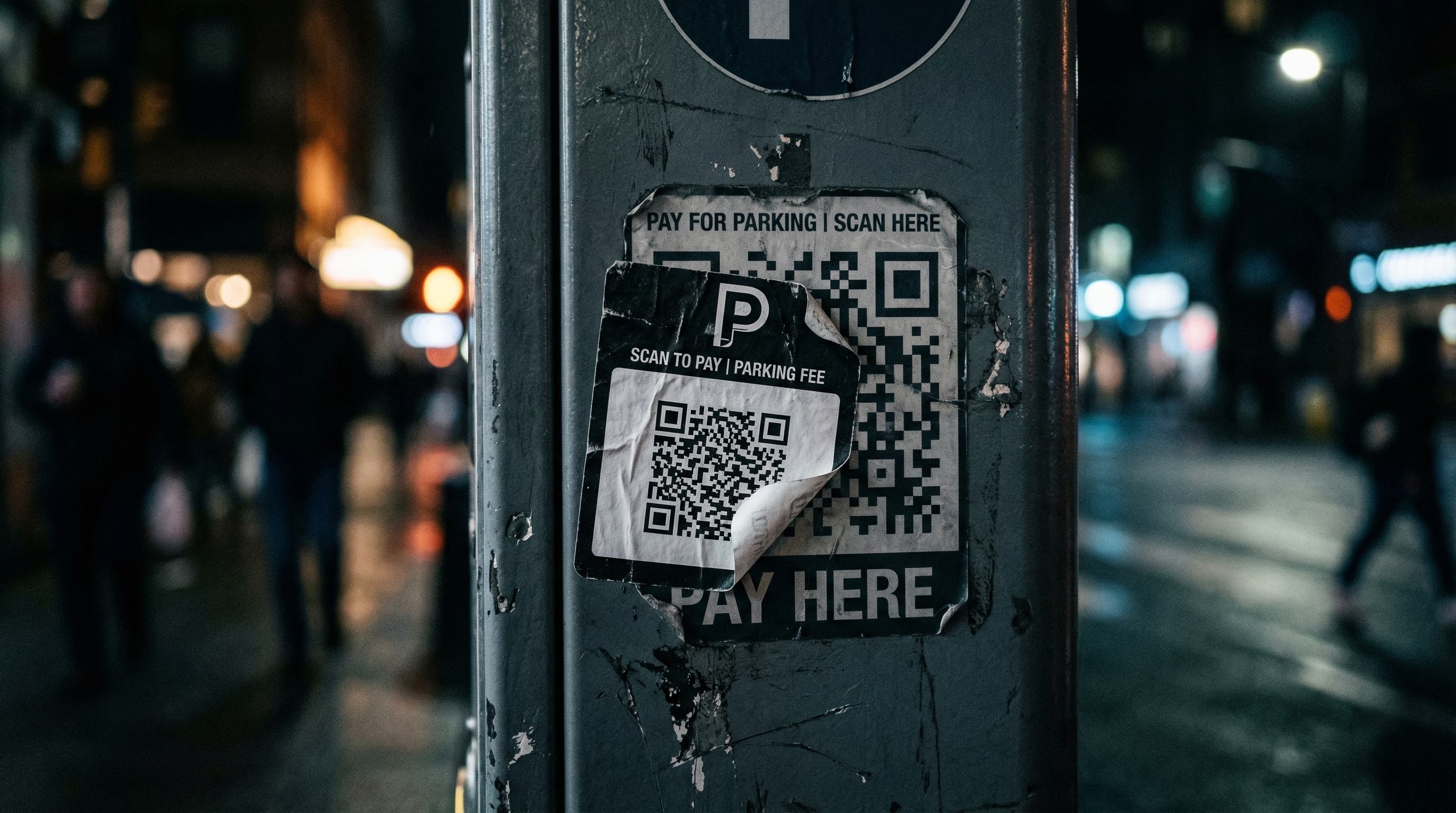
While email is the dominant quishing vector by volume, physical quishing attacks represent some of the most impactful incidents documented in the past 18 months — because they exploit a trust layer that no email security training prepares users for. When a QR code is printed on a physical object in a public or professional space, most people assume it is legitimate without question. The physical presence of an object implies a level of intentionality, authorization, and trust that a suspicious email does not.
Parking meter and payment kiosk attacks are the most widely documented form of physical quishing. The technique is simple: an attacker prints a malicious QR code sticker and places it directly over the legitimate payment QR code on a parking meter, electric vehicle charging station, or transit ticket kiosk. The sticker may have slightly imperfect edges that reveal the legitimate code beneath — but in a hurried parking scenario, almost nobody inspects the QR code carefully. The victim scans the sticker, is directed to a convincing payment page that collects their card details, and believes they have paid for parking. The US FBI and UK NCSC both issued advisories about this specific attack pattern in 2024.
Restaurant and hospitality quishing targets QR-based menus and WiFi access codes. A physical sticker with a malicious QR code placed on a restaurant table redirects visitors to a fake WiFi login portal or a fake loyalty program registration page that harvests email addresses and passwords. Since restaurant-goers routinely scan unknown QR codes to access menus without any verification, this vector has an exceptionally high click-through rate.
Package and delivery notification quishing involves leaving a physical card or sticker at a target's door — impersonating a delivery company (FedEx, DHL, Correos in Spain) — instructing them to scan a QR code to reschedule or track a failed delivery. This is a high-trust context: the victim is expecting a delivery, the card looks professionally printed, and the QR code leads to a convincing delivery company login page. Credential harvesting campaigns using this technique have been documented in Spain, Germany, and the UK throughout 2025.
Conference and event quishing uses registration badges, event signage, and presentation slides as delivery vectors. Attackers attending or crashing professional events place malicious QR stickers on registration materials or submit presentation slides containing malicious QR codes. In a conference environment, scanning QR codes from slides and materials is a completely normalized, expected behavior — making this an extremely high-conversion physical attack.
The defense against physical quishing is simple but requires deliberate habit: always preview the URL before opening it. Most modern QR scanner apps — including iOS 17+ Camera, Google Lens, and dedicated QR apps — show the decoded URL before opening the browser. Take one second to read it. If the URL doesn't match the expected organization (e.g., a parking meter QR that resolves to park-pay-secure.xyz instead of the city's official payment platform), do not proceed. If in doubt, type the payment URL manually from information on the physical kiosk itself.
urlscanner.online
Scan Any URL — In Under 2 Seconds.
8 parallel security modules: malware, SSL, DNS, phishing, WHOIS, headers, screenshots, and AI scoring. 100% private.
The Mobile Threat Surface: Why Your Phone Is the Weakest Link
The reason quishing is so effective at bypassing corporate security controls is not accidental — it is a direct consequence of a structural asymmetry in how organizations deploy security tooling. On a managed corporate laptop, there is typically a substantial security stack: endpoint protection, a corporate proxy that inspects outbound web traffic, DLP agents, browser extensions enforcing safe browsing policies, and sometimes SSL inspection. The same employee's personal phone — or even their corporate phone — typically has none of these controls applied to the browser.
Mobile Device Management (MDM) enrollment gives IT departments control over device configuration, email profiles, app installation policies, and VPN enforcement. What it does not provide is real-time inspection of browser traffic initiated by the camera app decoding a QR code. When a user scans a QR code, the URL is opened by the system browser — typically Safari on iOS or Chrome on Android — via a native OS deep link. MDM policies do not intercept this flow. The browser opens the URL on the carrier or WiFi network, bypassing any corporate VPN or proxy.
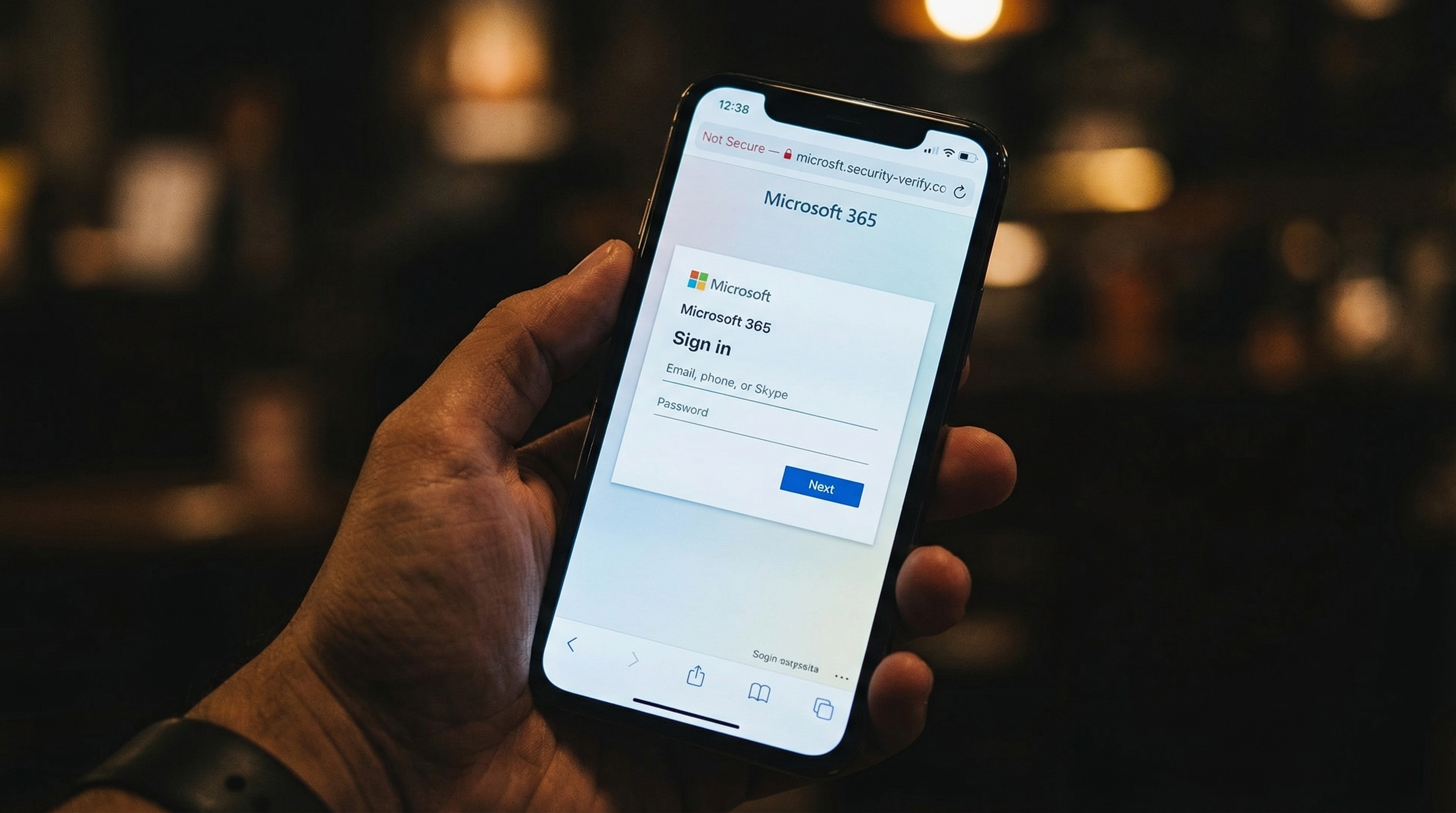
The URL bar problem on mobile compounds the risk. Desktop browsers display the full URL prominently in a large address bar that users have been trained to check. Mobile browsers display a truncated URL in a small bar that collapses when the user scrolls down. On an iPhone with Safari, a phishing URL like https://microsoft-security-verify.com/login is truncated to show only microsoft-security-verify.com — which looks plausible to a user who is already in a mobile context and not expecting to scrutinize a URL. The attacker's domain looks legitimate at a glance.
Phishing pages are now mobile-first by design. In 2024–2025, threat actors profiling their campaigns noted that quishing victims almost universally arrive via mobile browser. Phishing pages delivered via quishing are therefore specifically designed and tested for mobile rendering: they load fast on mobile connections, use touch-friendly login forms, display correctly on small screens, and trigger native mobile UI elements (like camera permissions or biometric prompts) to increase the appearance of legitimacy and reduce the time the victim spends visually scrutinizing the page.
Push notification hijacking is an advanced technique used in some quishing campaigns. After the victim visits the phishing page, the page requests browser push notification permission — a standard web API. If the victim approves, the attacker can send persistent notifications to the phone even after the browser tab is closed, directing the victim to revisit the phishing page, to 'verify their account again,' or to install a malicious application. This converts a one-time phishing visit into a persistent harassment vector.
Quishing Campaigns in the Wild: Documented Cases 2025–2026
Quishing is not a theoretical threat. The following campaigns have been documented and analyzed through threat intelligence sources, incident response reports, and our own infrastructure scanning activity.
Microsoft 365 MFA Re-enrollment Campaign (Global, Q3–Q4 2025). The most widely documented quishing campaign of 2025 targeted Microsoft 365 users across North America, Western Europe, and Australia. Tens of millions of emails were sent impersonating Microsoft IT security teams, instructing recipients to scan a QR code to re-enroll their MFA device in response to a fabricated 'security policy update.' The campaign used AiTM proxy infrastructure (Evilginx2-based) to capture session cookies in real time, bypassing MFA entirely. Proofpoint estimated that 0.3–0.8% of recipients scanned the QR code — meaning a campaign of 50 million emails produced between 150,000 and 400,000 successful credential captures.
DocuSign-Themed Quishing (European Enterprises, Q4 2025). A highly targeted campaign impersonated DocuSign to deliver quishing attacks against finance teams at mid-to-large European companies. The emails were crafted with accurate DocuSign branding, referenced real transaction terminology, and embedded a QR code instructing the finance manager to 'authenticate to review a pending contract.' The phishing page was a pixel-perfect DocuSign login clone. The goal was BEC enablement: once the victim's DocuSign account was compromised, attackers injected themselves into active contract flows to redirect payment bank details.
Spanish Banking Sector QR Phishing (Spain, Q1 2026). Our own threat intelligence monitoring identified a campaign in January–February 2026 specifically targeting customers of Spanish financial institutions via physical and email quishing. Sticker-based attacks on ATMs and in-branch payment terminals were combined with email campaigns impersonating Banco Santander, CaixaBank, and BBVA with QR codes purporting to link to 'nueva normativa de acceso digital' (new digital access regulation) login flows. The campaign harvested online banking credentials and session tokens, with downstream fraud executed within hours of compromise.
Energy Sector Targeted Quishing (Middle East and Europe, 2025–2026). CISA and ENISA advisories published in late 2025 documented quishing used by nation-state actors targeting energy infrastructure operators. Spear-phishing emails impersonating industrial control system (ICS) vendors delivered QR codes to engineering and operations staff. The phishing pages harvested VPN credentials and OT network access portal logins. The goal was assessed to be pre-positioning for potential disruptive attacks on energy infrastructure rather than immediate financial gain.
| Campaign | Target | Lure | Scale | Outcome |
|---|---|---|---|---|
| MS365 MFA Re-enrollment | Global corporate users | Fake Microsoft MFA policy | 50M+ emails | 150K–400K credential captures (est.) |
| DocuSign BEC Quishing | European finance teams | Pending contract signature | Targeted (thousands) | BEC payment fraud enablement |
| Spanish Banking QR | Spanish bank customers | Digital banking re-enrollment | Physical + email | Banking credentials, session tokens |
| Energy Sector Spear-Quishing | ICS/OT engineers, EU+ME | Vendor software portal access | Highly targeted | VPN / OT access credential theft |
Why Visual Inspection of QR Codes Always Fails
A natural response to learning about quishing is to think: 'I'll just look at the QR code carefully before scanning it.' This instinct, while reasonable, is fundamentally unworkable — and understanding why is essential for building habits that actually protect you.
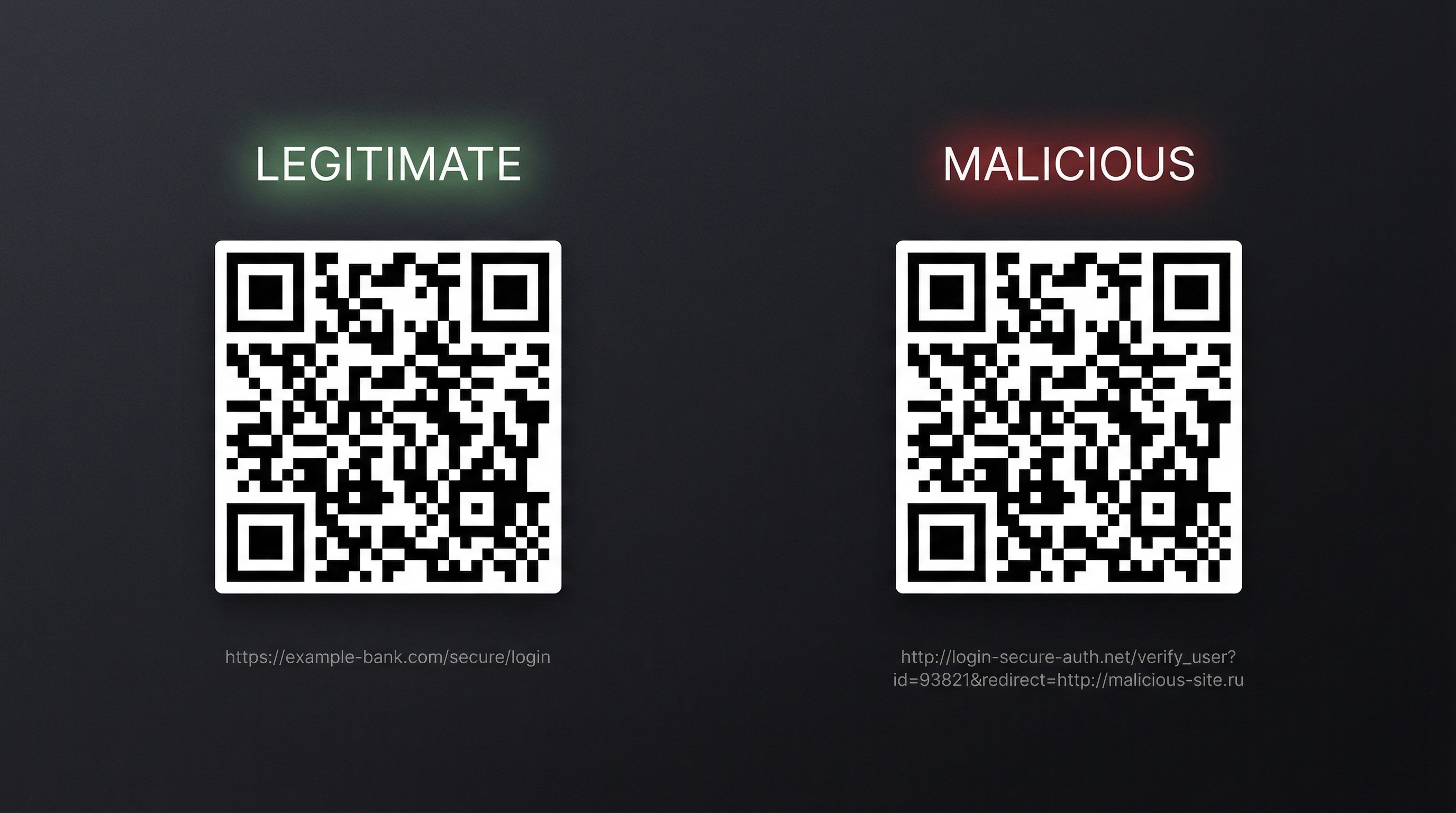
The core problem is that QR codes carry zero human-readable information about their content. A QR code encoding https://microsoft.com and a QR code encoding https://microsoft-security-verify-portal.xyz/phish are both patterns of black and white squares. Their visual appearance is entirely determined by the error correction level, the version (size), and the random-appearing data encoding of the content. There is no visual feature — no color, no pattern, no structural cue — that distinguishes a QR code containing a safe URL from one containing a malicious one.
The addition of a brand logo to a QR code provides no meaningful security signal. As explained in the technical section above, high error correction allows any image to be embedded in the center of any QR code. An attacker generating a quishing QR code for a Microsoft phishing page will use the exact same Microsoft logo that Microsoft uses on its own legitimate QR codes. The logo is cosmetic. It is extracted from Microsoft's public brand assets in seconds. It provides visual trust but zero actual authenticity.
The size and color of the QR code provide no information either. Attackers customize the colors, background, and module shape of their QR codes to match brand guidelines — a blue Microsoft QR, a green DocuSign QR, a yellow DHL QR — using the same tools that legitimate marketers use. The output is visually indistinguishable from an authentic QR code generated by the organization being impersonated.
The only meaningful information in a QR code is the URL it encodes — and that information is invisible to the human eye. It can only be determined by decoding the QR code and reading the resulting URL. The entire security evaluation must happen at the URL level, not the QR image level. This means: decode first, read the URL, evaluate the domain, and — if there is any doubt — submit the URL to URLScanner.online before opening it in any browser.
How to Check a QR Code URL Safely Before Opening It
The single most important habit for quishing defense is a simple procedural change: never allow a QR code to take you directly to a page without first reading and evaluating the URL it encodes. Here is the practical step-by-step process for individuals and teams.
Step 1 — Use a QR scanner that previews URLs. The default camera apps on iOS 17+ and Android 12+ both decode QR codes and display the URL as a banner before opening the browser. On iPhone: open the Camera app, point it at the QR code, and a yellow banner appears at the top of the screen showing the URL — read it before tapping. On Android: use Google Lens or the default camera. Do not use third-party QR scanner apps that auto-open URLs without previewing them.
Step 2 — Evaluate the domain in the URL. The domain is the part between https:// and the first forward slash. Ask: does this domain exactly match the organization I expect? microsoft.com is Microsoft. microsoft-account-security.com is not. docusign.com is DocuSign. docusign-portal.net is not. Any extra words, hyphens, numbers, or different TLDs are red flags. If the domain does not exactly match, do not open it.
Step 3 — Submit the URL to URLScanner before opening. If the URL looks plausible but you are not certain, or if you received the QR code unsolicited, copy the URL from the banner (long-press on iOS, tap and hold on Android) and paste it into URLScanner.online. The scanner visits the URL from an isolated environment, executes the full page JavaScript, captures a screenshot of what the page looks like, follows all redirect chains, checks the domain registration age and reputation, and cross-references against threat intelligence. It tells you exactly what you would have encountered — without any risk to your device or credentials.
What URLScanner specifically catches in quishing URLs: Domain age below 30 days (the overwhelming majority of quishing infrastructure uses freshly registered domains). Redirect chains through URL shorteners or dynamic QR services masking the final destination. JavaScript-based conditional rendering that returns different content to scanners vs. real mobile browsers. Phishing page indicators — login form cloning, brand impersonation, credential capture scripts. AiTM proxy behavior — the page relaying content from a real authentication server in real time. All of these are surfaced in the URLScanner analysis report, along with a plain-language risk verdict.
Step 4 — When in doubt, navigate directly. If a QR code in a professional email claims to take you to your Microsoft 365 account portal, open your browser and navigate to portal.office.com directly instead of scanning the QR. If a parking meter QR code claims to link to a payment system, check the meter itself for an official URL listed in print and type it manually. The core rule: a legitimate service will always have an alternative way to reach it that does not require you to scan an untrusted QR code.
Defense and Detection Recommendations
The following recommendations are organized by audience — individual users, IT administrators, and security teams — and prioritized by effectiveness and implementation effort.
For individuals: Adopt the three-step QR URL verification habit described above. Never scan QR codes from unsolicited emails or messages without previewing the URL. Report suspicious QR codes received in corporate email to your IT security team. If you receive a physical QR sticker that looks recently placed or has imperfect edges, do not scan it — inspect the underlying surface for the original QR code.
For IT administrators: Deploy DNS filtering with newly registered domain (NRD) blocking at the corporate DNS resolver level. Blocking domains registered within the last 30 days eliminates the vast majority of quishing infrastructure, which relies overwhelmingly on fresh domains. Products like Cisco Umbrella, Palo Alto DNS Security, Cloudflare Gateway, and NextDNS support this feature. Configure Mobile Device Management (MDM) to enforce a DNS profile on both corporate and enrolled personal devices, so mobile browsing traffic is subject to the same NRD filtering as desktop traffic — this is the closest available mitigation for the gateway bypass at the mobile level.
For IT administrators (email): Evaluate whether your email security platform supports QR code decoding and URL extraction from images. As of 2026, Proofpoint TAP and Abnormal Security both offer this capability. Even with QR decoding enabled, verify that the capability covers QR codes embedded inside PDF attachments, not just inline body images — this is where most enterprise deployments have a gap. Implement a policy of requiring all QR-containing emails from external senders to be flagged for review before delivery.
For security teams: Include quishing in your phishing simulation program. Generic email phishing simulations do not train users to recognize QR code attacks. Run dedicated quishing simulations — send employees a QR code email and measure how many scan it and submit credentials. Provide specific, scenario-based awareness content: show employees screenshots of real quishing lures side by side with legitimate communications. The single most effective training message for quishing is: 'Read the URL before you tap. If it does not exactly match the organization, it is not them.'
For security teams (incident response): When a quishing incident is suspected, the first step is recovering the QR code image from the email and decoding it to extract the URL. Submit the decoded URL to URLScanner.online for behavioral analysis and redirect chain tracing. If any files were downloaded to the victim's device after visiting the URL, submit them to FileScanner.online for multi-engine malware analysis before conducting any further investigation on the device. Preserve the QR code image as evidence and report the phishing URL to your email security vendor for intelligence ingestion.
| Control | Audience | Implementation Effort | Quishing Effectiveness | Key Limitation |
|---|---|---|---|---|
| QR URL preview habit | Individuals | None (behavioral) | High — stops most attacks | Requires consistent adoption |
| URL scanner (URLScanner.online) | Individuals + IR teams | None (browser / app) | Very High — full behavioral analysis | Requires URL extraction from QR first |
| DNS NRD blocking (mobile + desktop) | IT Admins | Low–Medium (DNS config) | High — kills fresh infra | Aged or legitimate-hosted domains bypass |
| MDM DNS profile enforcement | IT Admins | Medium | Medium — closes mobile gateway gap | Doesn't inspect encrypted traffic content |
| Email gateway QR decoding | IT Admins | Medium (vendor feature) | Medium — improves detection | Gap: PDFs, conditional rendering, dynamic QR |
| Quishing simulation + training | Security Teams | Medium (program design) | Very High — addresses root cause | Requires regular reinforcement |
| File scanning (FileScanner.online) | IR Teams | None (browser / app) | Very High — identifies downloaded malware | Post-visit response, not prevention |
filescanner.online
Scan Any File — Privately.
Deep binary analysis, YARA rules, AI summary, and PDF reports. Up to 2 GB. No account required.
Frequently Asked Questions
What is quishing? Quishing is a form of phishing that uses QR codes to deliver malicious URLs instead of traditional hyperlinks. Because the URL is encoded inside an image, it bypasses email security tools that scan for suspicious links in message text. The victim scans the QR code with their smartphone, which opens the phishing URL directly in the mobile browser.
Why can't email gateways stop quishing? Standard email gateways are designed to scan URLs in email text and HTML. A QR code is an image file — the gateway sees a PNG or JPEG, not a URL. Without a dedicated QR decoding and URL extraction step (which most gateways lack, or only partially support), the phishing URL inside the QR code is completely invisible to the scanner.
How do I check if a QR code is safe? Use a QR scanner app that previews the URL before opening it (the standard iOS and Android camera apps do this). Read the URL — the domain should exactly match the organization you expect. If you're unsure, copy the URL and paste it into URLScanner.online, which will analyze the page fully from an isolated environment without opening it on your device.
Can I tell if a QR code is malicious just by looking at it? No. QR codes carry no human-readable information about their content. A malicious QR code looks identical to a legitimate one. Even embedded brand logos provide no authentication — they are cosmetic and trivially copied by attackers. The only way to evaluate a QR code is to decode it and check the URL it encodes.
Is it safe to scan QR codes on parking meters and restaurant menus? Not without verifying the URL first. Physical quishing attacks — placing malicious QR sticker overlays on legitimate QR codes in public locations — are well documented. Always preview the decoded URL before opening it, and check that the domain matches the expected payment or service provider. Inspect the physical QR code for signs of a sticker overlay (imperfect edges, slight texture difference, misaligned border).
What happens if I've already scanned a malicious QR code? If you scanned the code but did not enter any information on the page that opened, your risk is limited. Close the browser tab immediately. Copy the URL from your browser history and submit it to URLScanner.online to understand what you were exposed to. If you entered credentials, change your password for that service immediately and enable multi-factor authentication. If a file was downloaded, do not open it — submit it to FileScanner.online for malware analysis.
Do QR codes from trusted organizations guarantee safety? No. Attackers clone the visual appearance of QR codes from Microsoft, DocuSign, PayPal, and other trusted brands. The embedded logo and brand colors are cosmetic — they prove nothing about where the QR code actually leads. Always verify the URL, regardless of how legitimate the QR code looks.
How do attackers generate malicious QR codes so easily? Free, public QR code generator websites allow anyone to encode any URL into a downloadable QR code image in under 30 seconds, with no registration required. Attackers can also use open-source programming libraries to generate thousands of customized QR codes automatically. The technical barrier is effectively zero — quishing requires no specialized skills beyond creating a phishing page.