 FileScanner.online
 URLScanner.online
A Phishing Campaign Built to Defeat Every Standard Defense
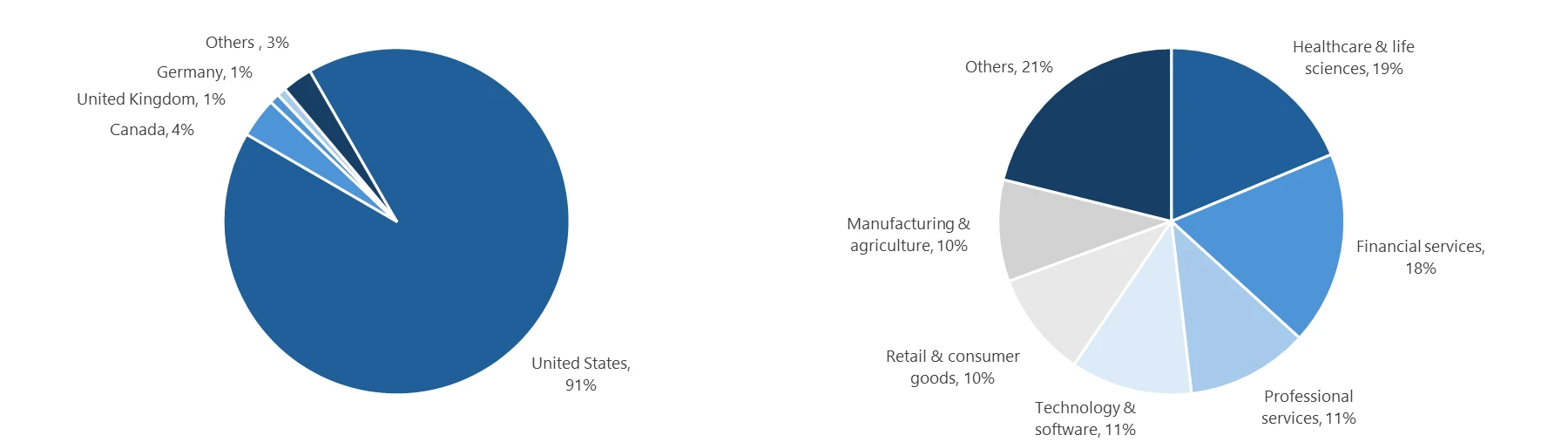
Between April 14 and 16, 2026, the Microsoft Defender Security Research Team observed one of the most technically refined phishing campaigns tracked in recent months. In under 45 hours of active operation, attackers sent messages to more than 35,000 individuals across 13,000 organizations in 26 countries. Ninety-two percent of targets were in the United States. The most impacted industries were Healthcare & life sciences (19%), Financial services (18%), Professional services (11%), and Technology & software (11%).
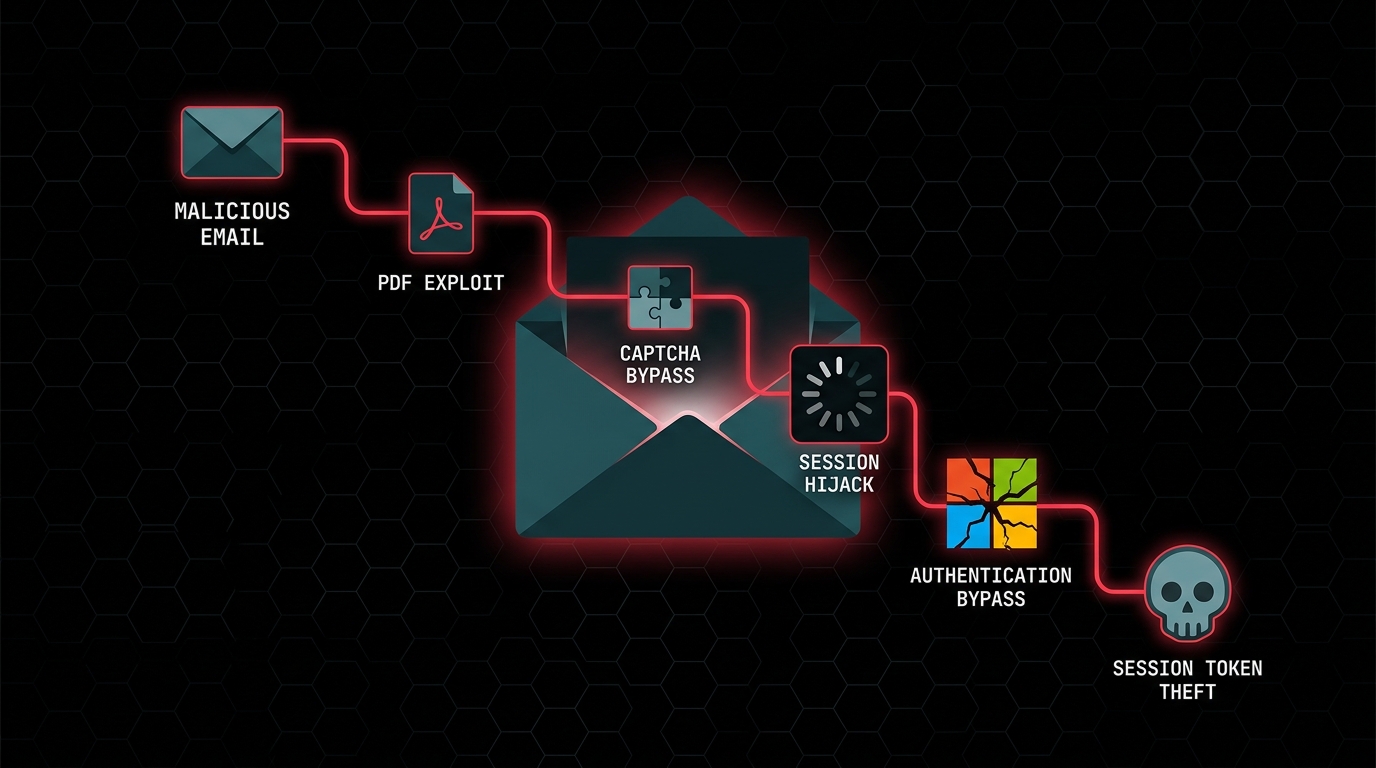
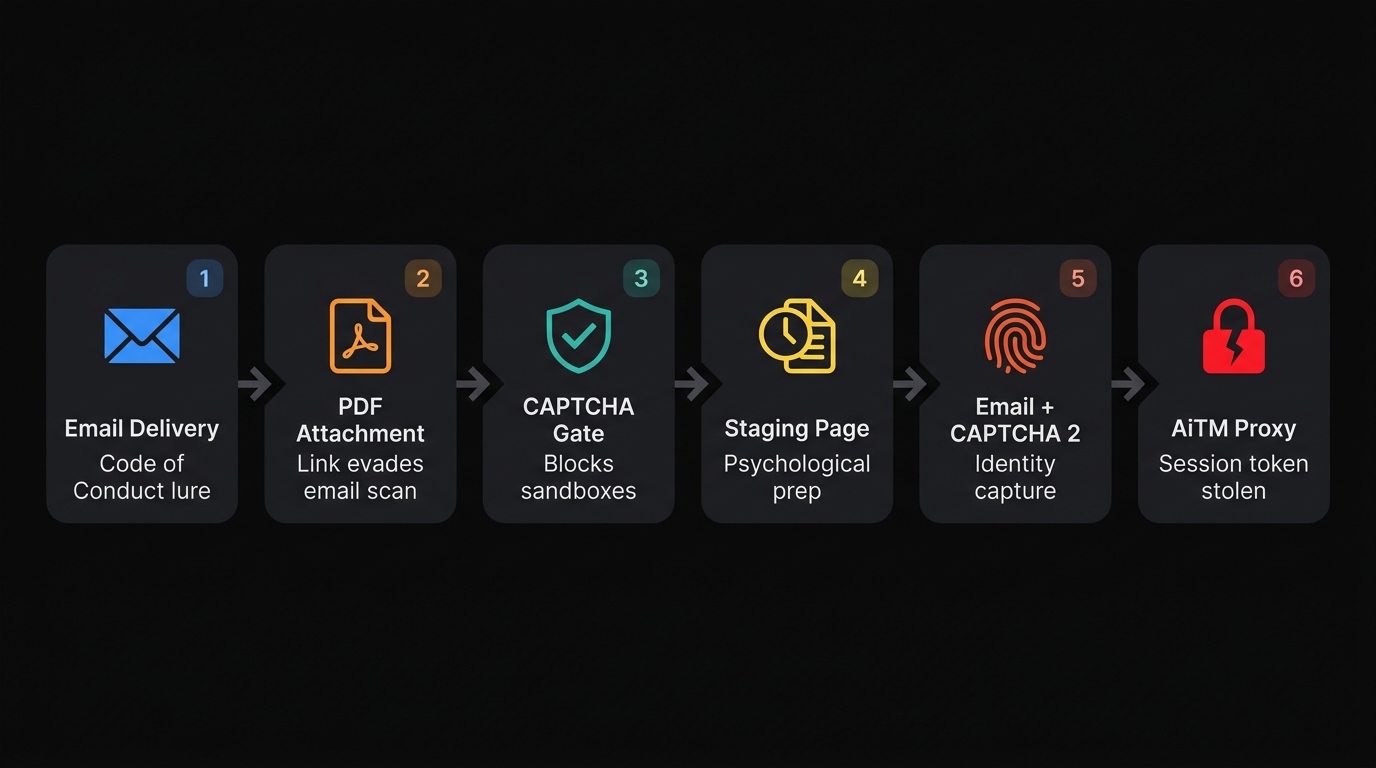
What makes this campaign exceptional is not its scale — large phishing operations are routine — but its architecture. The attackers combined six distinct stages, each designed to defeat a different layer of organizational defense: a socially engineered email that mimics legitimate internal communications, a PDF attachment that sidesteps link-scanning of the email body, a Cloudflare CAPTCHA that filters out security sandboxes, an intermediate staging page that conditions victims psychologically, a second image-selection CAPTCHA, and finally an adversary-in-the-middle (AiTM) authentication proxy that captures session tokens in real time — bypassing non-phishing-resistant multifactor authentication entirely.
This article provides a complete technical breakdown of the campaign, based on the analysis published by the Microsoft Defender Security Research Team on May 4, 2026. We cover the attack chain step by step, the psychological techniques used in the lures, the AiTM mechanism, all published indicators of compromise, and the detection and mitigation actions you can take today.
The Lure: Why "Code of Conduct" Works on Every Industry
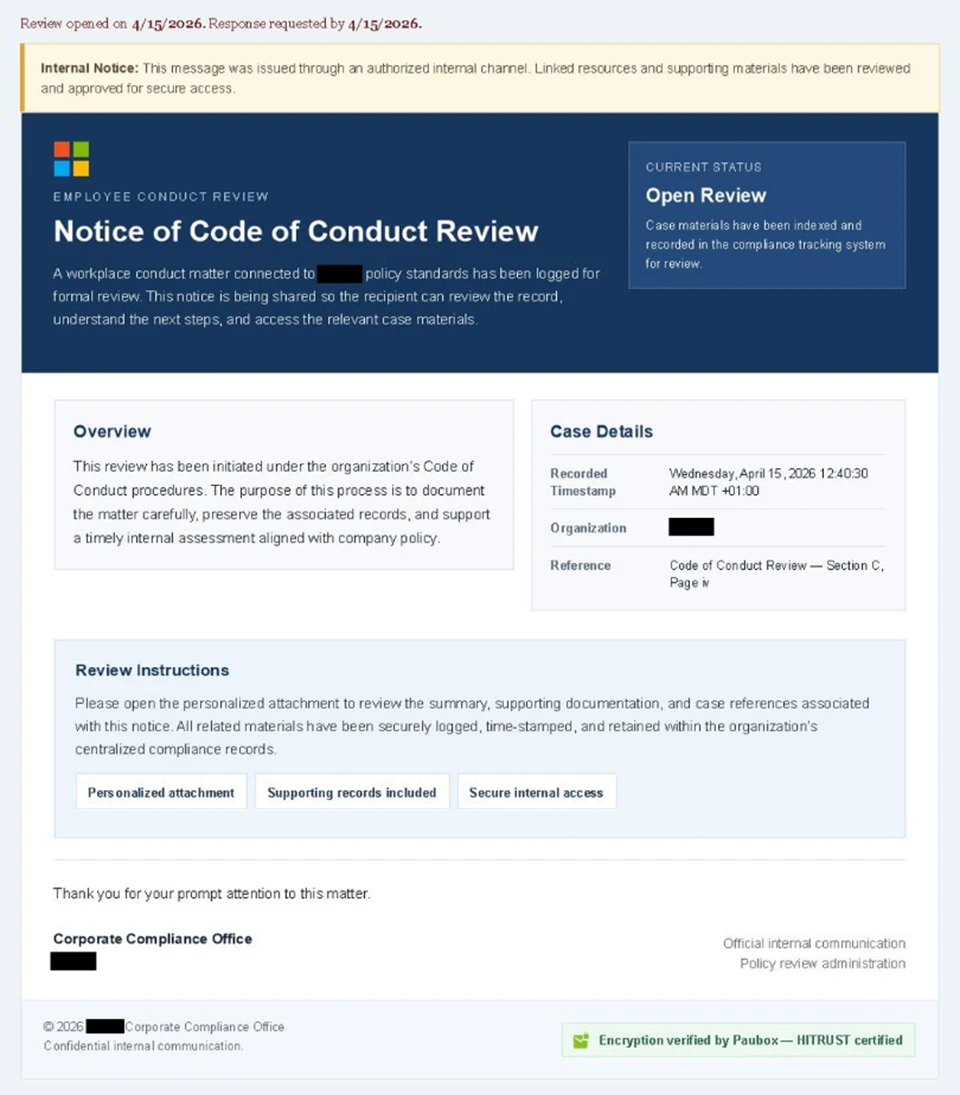
The campaign emails posed as internal compliance or regulatory communications. Sender display names included "Internal Regulatory COC", "Workforce Communications", and "Team Conduct Report". Subject lines read "Internal case log issued under conduct policy" and "Reminder: employer opened a non-compliance case log".
The choice of lure is deliberate and sophisticated. A "code of conduct review" creates immediate psychological pressure in ways that other phishing pretexts do not. It implies wrongdoing on the part of the recipient. It suggests urgency (a "case" has been opened). It references authority (compliance, regulatory, conduct policy). It is personal — the message contained organization-specific names embedded in the body. And unlike invoice fraud or shipping notifications, it does not have a natural "this doesn't apply to me" dismissal path for most employees. Most recipients will feel compelled to investigate, even if they are suspicious.
The email design reinforced legitimacy at every level. At the top of each message, a notice stated that it had been "issued through an authorized internal channel" and that links and attachments had been "reviewed and approved for secure access." At the bottom, a green banner attributed the message's encryption to Paubox — a real, HIPAA-compliant email encryption service widely recognized in the healthcare industry. The combination of these trust signals made the messages appear more credible than typical phishing emails, particularly for targets in healthcare and regulated industries.
Microsoft also noted that the campaign created "a sense of urgency and pressure to act" through "time-bound action prompts" — language instructing recipients to act within a defined window to avoid consequences. This is a textbook urgency-pressure technique that degrades analytical thinking and pushes victims toward compliance before skepticism has time to engage.
Stage 1 — The PDF Trap: Why the Attack Starts in the Attachment
Rather than embedding a malicious link directly in the email body — where it would be immediately subject to URL reputation scanning, Safe Links rewriting, and domain age checks — the attackers placed the credential-harvesting link inside a PDF attachment. This is a key architectural decision: email security gateways inspect URLs in the message body very aggressively, but PDF link extraction and analysis is less consistent and slower.
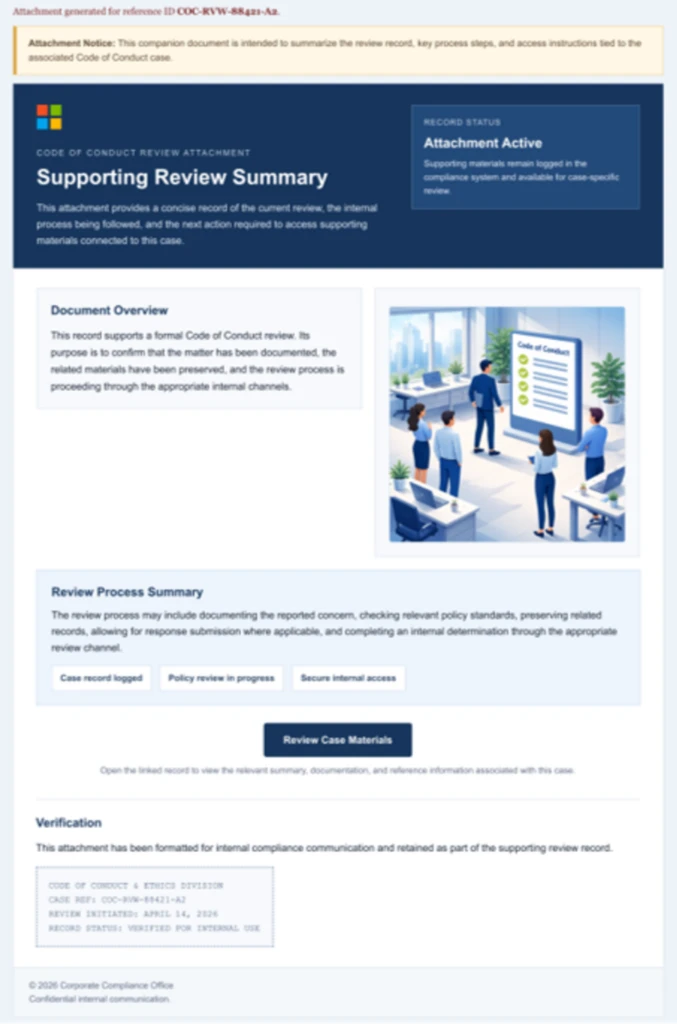
PDF filenames were designed to match the campaign's compliance lure precisely: Awareness Case Log File – Tuesday 14th, April 2026.pdf and Disciplinary Action – Employee Device Handling Case.pdf. The filenames changed day by day during the campaign's three-day run, making content-based blocking on filename alone ineffective.
The PDF itself was professionally designed — not a rushed placeholder. It provided a structured summary of the supposed conduct review process and included a clearly labeled "Review Case Materials" call-to-action button. This polished presentation served two purposes: it further reinforced the email's legitimacy, and it normalized the act of clicking the button as a routine administrative step rather than a suspicious action.
The PDF link pointed to one of two attacker-controlled domains: acceptable-use-policy-calendly[.]de or compliance-protectionoutlook[.]de. Both domain names are constructed to visually resemble legitimate service names — "Calendly" (a real scheduling app) and "compliance protection" paired with a subdomain suggesting Outlook. At a glance, especially under time pressure, these read as plausible corporate service domains.
filescanner.online
Scan Any File — Privately.
Deep binary analysis, YARA rules, AI summary, and PDF reports. Up to 2 GB. No account required.
Stages 2 & 3 — CAPTCHA Gating and the Intermediate Staging Page
When a victim clicked the PDF link, they did not land directly on a sign-in page. Instead, they encountered a Cloudflare CAPTCHA challenge presented as a mechanism to "validate that the user was coming from a valid session." This framing is clever: CAPTCHA is a familiar, trusted user experience that most people associate with security, not attacks. Seeing a CAPTCHA made the site feel more legitimate, not less.
From a defense-evasion standpoint, the CAPTCHA serves a second critical function: it blocks automated sandbox analysis. Most commercial URL detonation sandboxes and web crawlers cannot solve interactive CAPTCHAs. A URL that leads to a CAPTCHA may be marked "unable to analyze" rather than "malicious" — allowing it to pass through automated defenses and land in the victim's browser unblocked.
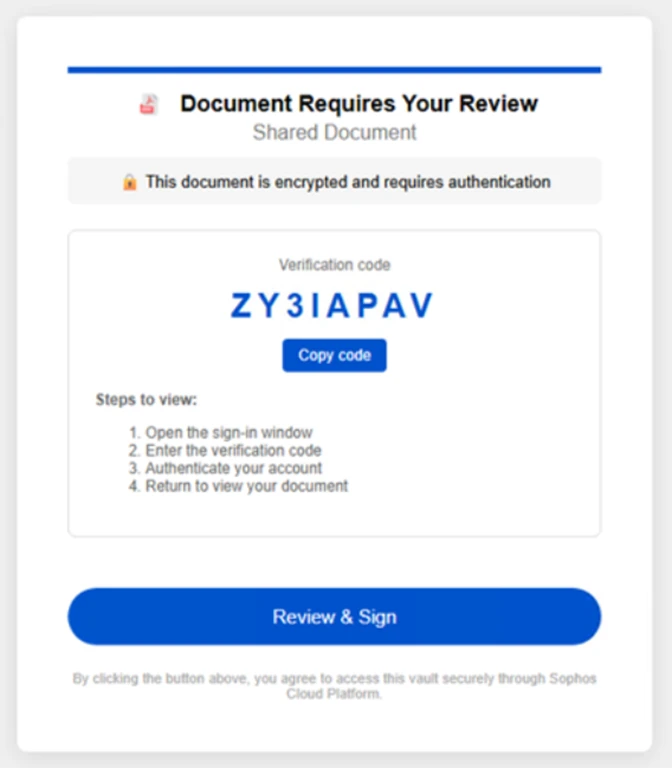
After completing the first CAPTCHA, victims were redirected to an intermediate staging page. This page was designed to condition them psychologically for the final authentication step. It informed them that the requested documentation was "encrypted" and required account authentication to access. A prominent "Review & Sign" button gave victims a clear, low-friction action to take. The page's language and design deliberately echoed legitimate document-signing services like DocuSign and Adobe Sign — services where being asked to authenticate before viewing a document is completely normal.
After clicking "Review & Sign", victims were shown a prompt asking for their email address. After entering it, they were presented with a second CAPTCHA — this time an image-selection challenge. Following this, a "Verification completed successfully" message appeared and informed them that their case was being prepared. Each of these micro-interactions served the same purpose: by the time victims reached the final sign-in page, they had already invested multiple steps and received repeated positive feedback, making them far less likely to abandon the flow or question its legitimacy.
Stage 4 — AiTM Token Theft: How the Attack Bypasses MFA
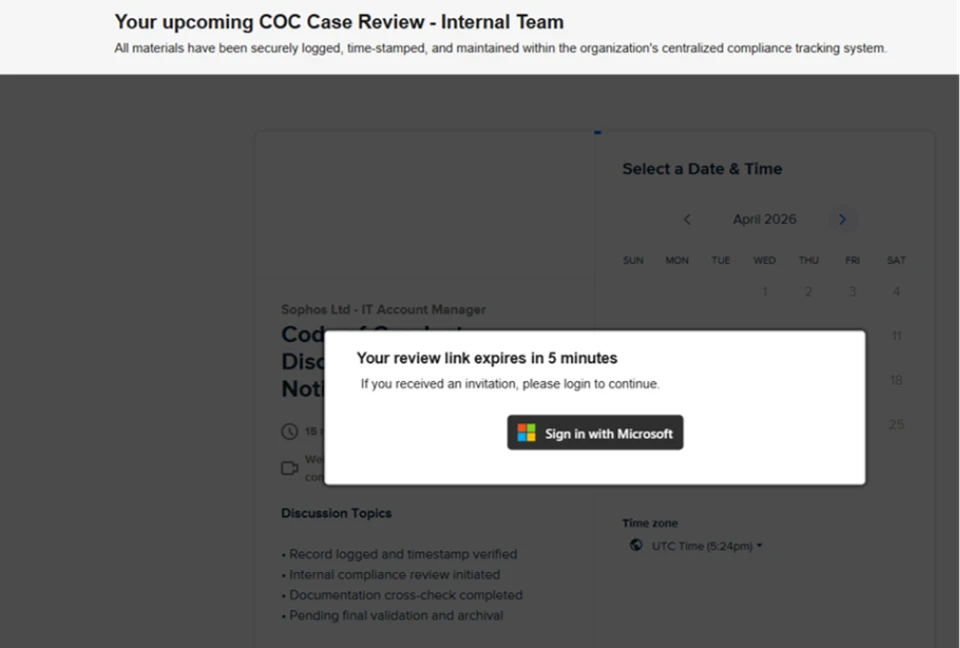
The final stage of the attack is where credential theft actually occurs — and it goes significantly further than traditional credential harvesting. After completing the verification steps, victims were presented with a final page stating that all materials related to their code of conduct review had been "securely logged" and "time-stamped." They were then prompted to schedule a discussion of their case, which required signing in to their account.
Clicking "Sign in with Microsoft" did not take victims to Microsoft's servers. Instead, it initiated an adversary-in-the-middle (AiTM) phishing flow. In this model, the attacker's server acts as a proxy between the victim and the legitimate Microsoft authentication endpoint. The victim sees a genuine-looking Microsoft sign-in page (because they are, in effect, being served the real one through the attacker's relay). They enter their credentials. If they have MFA enabled, they complete the MFA challenge. The attacker's server relays all of this in real time — and in the process, captures the authenticated session cookie that Microsoft issues after a successful sign-in.
This is the key distinction from traditional phishing. Standard credential harvesting captures a username and password — which MFA protects against, because the attacker cannot log in without the second factor. AiTM attacks do not need the password or the MFA code after the fact. They capture the authenticated session token — the cryptographic credential that proves the full authentication already happened. With a valid session token, an attacker can access the victim's account immediately, from any device, without triggering MFA again.
Non-phishing-resistant MFA (TOTP apps, SMS codes, push notifications) does not protect against AiTM. The only effective countermeasures are phishing-resistant authentication methods — specifically FIDO2 hardware security keys and Windows Hello for Business — which cryptographically bind the authentication to the legitimate origin domain, making the credential unusable if intercepted by a proxy at a different domain.
Microsoft noted that while the final stage showed hallmarks consistent with device code phishing, researchers were only able to confirm the AiTM portion of the attack chain during analysis.
The Full Attack Chain: Six Stages, Zero Shortcuts
Looking at the campaign as a whole, what is striking is how deliberately each stage was designed to fail gracefully for the attacker's purposes. If a sandbox detonates the email link, it hits the first CAPTCHA and stops — no malicious behavior observed. If a user visits but does not complete the CAPTCHA, nothing is learned. If a user abandons at the email-entry step, only their email address is captured. Each stage was both a psychological conditioning step and a defense-evasion layer.
The complete chain can be summarized as follows:
Stage 1 — Email delivery: Authenticated phishing email from attacker-controlled domain, sent via legitimate cloud email service. HTML template with enterprise styling, authority framing, urgency pressure, and Paubox trust badge.
Stage 2 — PDF attachment: Professional PDF with "Review Case Materials" button. Link points to attacker domain. Evades email body URL scanning.
Stage 3 — First CAPTCHA: Cloudflare CAPTCHA on attacker landing page. Blocks automated sandboxes, adds legitimacy signal to victim.
Stage 4 — Intermediate staging page: Psychological conditioning. Tells victim documents are encrypted and require authentication. "Review & Sign" CTA.
Stage 5 — Email entry + second CAPTCHA: Captures victim's email address. Image-selection CAPTCHA adds another friction layer and legitimacy reinforcement.
Stage 6 — AiTM sign-in proxy: Microsoft authentication page served through attacker proxy in real time. Captures authenticated session token. MFA completed but irrelevant — token is stolen after authentication succeeds.
Indicators of Compromise
The following indicators were published by Microsoft Defender Research alongside their May 4, 2026 analysis. Block these at your email gateway, proxy, and firewall layers. Hash indicators can be used for endpoint detection via EDR policies. All domain indicators are defanged; replace [.] with . for operational use.
| Indicator | Type | Description | First Seen | Last Seen |
|---|---|---|---|---|
| compliance-protectionoutlook[.]de | Domain | Attacker-controlled campaign landing page | 2026-04-14 | 2026-04-16 |
| acceptable-use-policy-calendly[.]de | Domain | Attacker-controlled campaign landing page | 2026-04-14 | 2026-04-16 |
| cocinternal[.]com | Domain | Sender email domain | 2026-04-14 | 2026-04-16 |
| gadellinet[.]com | Domain | Sender email domain | 2026-04-14 | 2026-04-16 |
| harteprn[.]com | Domain | Sender email domain | 2026-04-14 | 2026-04-16 |
| cocpostmaster[@]cocinternal.com | Email address | Campaign sender address | 2026-04-14 | 2026-04-16 |
| nationaladmin[@]gadellinet.com | Email address | Campaign sender address | 2026-04-14 | 2026-04-16 |
| nationalintegrity[@]harteprn.com | Email address | Campaign sender address | 2026-04-14 | 2026-04-16 |
| m365premiumcommunications[@]cocinternal.com | Email address | Campaign sender address | 2026-04-14 | 2026-04-16 |
| documentviewer[@]na.businesshellosign.de | Email address | Campaign sender address | 2026-04-14 | 2026-04-16 |
| 5DB1ECBBB2C90C51D81BDA138D4300B90EA5EB2885CCE1BD921D692214AECBC6 | SHA-256 | PDF attachment file hash | 2026-04-14 | 2026-04-16 |
| B5A3346082AC566B4494E6175F1CD9873B64ABE6C902DB49BD4E8088876C9EAD | SHA-256 | PDF attachment file hash | 2026-04-14 | 2026-04-16 |
| 11420D6D693BF8B19195E6B98FEDD03B9BCBC770B6988BC64CB788BFABE1A49D | SHA-256 | PDF attachment file hash | 2026-04-14 | 2026-04-16 |
urlscanner.online
Scan Any URL — In Under 2 Seconds.
8 parallel security modules: malware, SSL, DNS, phishing, WHOIS, headers, screenshots, and AI scoring. 100% private.
Detection: KQL Hunting Queries for Microsoft Defender
If you are a Microsoft Defender XDR customer, the following KQL advanced hunting queries let you search for activity related to this campaign in your environment. Run these against your EmailEvents table in the Defender portal.
Find campaign emails by sender address:
EmailEvents | where SenderMailFromAddress in ("[email protected]", "[email protected]", "[email protected]", "[email protected]", "[email protected]")
This query identifies emails sent from any of the five known campaign sender addresses. A result here means campaign messages reached your tenant. Pivot on the RecipientEmailAddress field to identify affected users, then cross-reference with AADSignInEventsBeta for sign-in anomalies in the same time window.
Behavioral indicators to hunt for in parallel: Search for Entra ID Protection alerts on Anomalous Token and Unfamiliar sign-in properties for session cookies for the same users and time period. Combine with Defender for Cloud Apps alerts on Impossible travel activity to identify accounts where stolen tokens were used from attacker-controlled infrastructure.
If you are not a Defender XDR customer: check your email gateway logs for messages with the sender domains listed in the IoC table above. Search your proxy/DNS logs for connections to compliance-protectionoutlook.de and acceptable-use-policy-calendly.de between April 14 and 16, 2026. Any connection to these domains from internal hosts indicates a user followed the phishing chain.
Mitigation: 9 Actions to Take Now
The most important single action against AiTM phishing is deploying phishing-resistant MFA — specifically FIDO2 security keys (YubiKey, Google Titan) or Windows Hello for Business — for all accounts with access to sensitive data or privileged operations. Standard TOTP apps, SMS codes, and push-notification MFA are all bypassable by AiTM. Phishing-resistant methods are not, because they cryptographically bind the authentication to the legitimate domain.
Beyond phishing-resistant MFA, Microsoft recommends the following mitigations for this specific campaign:
1. Enable Safe Links and Safe Attachments in Microsoft Defender for Office 365. Safe Links rewrites URLs at click time and checks reputation dynamically; Safe Attachments detonates PDF and Office attachments in a sandbox before delivery.
2. Enable Zero-Hour Auto Purge (ZAP) in Defender for Office 365. ZAP retroactively removes messages already delivered to mailboxes when new threat intelligence identifies them as malicious — useful for campaigns where initial delivery precedes detection.
3. Review EOP and Defender for Office 365 recommended settings. Ensure DMARC, DKIM, and SPF policies are enforced in reject/quarantine mode for inbound mail. Apply anti-spoofing policies that flag display name impersonation of internal departments.
4. Deploy network protection in Microsoft Defender for Endpoint. Network protection extends SmartScreen to all outbound TCP/IP traffic at the host level, blocking connections to known phishing infrastructure even when users bypass the browser.
5. Configure Conditional Access with token binding. Require compliant or hybrid Azure AD-joined devices for access to sensitive resources. Token binding reduces the value of stolen session cookies by tying them to the originating device.
6. Enable automatic attack disruption in Microsoft Defender XDR. This feature automatically contains active attacks — isolating compromised accounts and blocking lateral movement — while your security team investigates.
7. Run phishing simulations on your users. Use Microsoft Defender for Office 365 Attack Simulation Training, or a comparable platform, to run "code of conduct" themed simulations specifically. Users who have been trained on this lure archetype are measurably less likely to fall for real campaigns using the same pattern.
8. Block or monitor AF_ALG domains at your DNS/proxy layer. Add the IoC domains from this campaign to your DNS sinkhole or web proxy blocklist. Use your EDR platform to alert on process trees that originate from browser child processes accessing newly registered .de domains with compliance or policy themes in the subdomain.
9. Review sign-in logs for anomalous token events. In Microsoft Entra ID, enable and review alerts for Anomalous Token and Unfamiliar sign-in properties risk detections. These are the primary post-compromise signals for AiTM session token theft.
The Bigger Picture: Why AiTM Is the New Standard for Sophisticated Phishing
This campaign represents a maturation that security teams need to internalize: AiTM is no longer an advanced technique reserved for nation-state actors. It is now a component in large-scale, industrialized phishing operations targeting tens of thousands of ordinary enterprise users across every sector. The technical barrier to deploying an AiTM proxy has dropped significantly, with open-source toolkits like Evilginx and Modlishka making reverse proxy phishing accessible to threat actors well below the nation-state tier.
The multi-layer defense evasion in this campaign — PDF attachment to bypass link scanning, CAPTCHA to block sandboxes, intermediate staging page to condition victims, mobile/desktop split redirection at the final stage — demonstrates that attacker operational security in email campaigns has matured to match the sophistication of the email security tools it is evading. Each layer of the attack was designed with knowledge of specific defensive controls.
For defenders, the most important operational insight is this: if your MFA deployment still relies primarily on TOTP apps or push notifications, you have a gap that this campaign class exploits reliably. FIDO2 and Windows Hello for Business are no longer optional hardening measures for high-security environments only — they are the minimum bar against a threat that is now targeting broad enterprise populations at scale.
The secondary insight is equally important: endpoint detection, network-layer controls, and behavioral analytics (anomalous token alerts, impossible travel) are your best post-compromise detection surface when the authentication flow itself has been compromised. Layer these controls now, before the next wave of this campaign — or its next evolution — lands in your users' inboxes.